Table of contents
Table of contents
AI forecasting helps you spot drift from forecast figures earlier by showing you changes in revenue, cost, and project economics while there's still time to respond. This is important in project-based work, as small variations in utilization, staffing mix, and work-in-progress (WIP) inventory can lead to write-offs and delayed cash collection.
AI forecasting highlights what changed and why, so you can protect profit margins, adjust workloads, and invoice faster. This article explains how AI forecasting differs from traditional forecasting and how a connected AI-native ERP, like Intuit Enterprise Suite, can help you automate intercompany utilization and margin tracking.

What's the difference between traditional and AI forecasting?
Traditional forecasts involve finance teams building a model around high-level summarized data and updating it on a set cycle. By the time of each refresh, you've already missed several opportunities to address changes that can negatively impact your numbers.
You can't see which service line or office is off track until the period closes, so your only remaining solutions are write-offs or collections drives.
On the other hand, artificial intelligence forecasting is continuous. It builds forecasts from your financial and delivery data, updating predictions as that data changes, even in multi-entity firms.
You see what’s influencing the updated forecasts, like proximity to utilization targets, aging WIP, and whether forecast cash stays above your minimum buffer.
AI forecasting uses these two types of AI:
- Agentic AI runs the workflow, updating the forecast when it receives new data.
- Generative AI explains the variance, showing you what’s changed and what the likely causes are.
So AI produces the forecast and commentary, but you set the assumptions and key inputs to monitor and approve any decisions.
3 powerful ways to protect your profit margins with AI
Margin erosion can begin at any point during a project, eventually compounding into write-offs. AI forecasting allows teams to spot variances early and mitigate them in three ways:
Automate anomaly detection
A modern ERP, like Intuit Enterprise Suite, can continuously monitor project goal profitability. It immediately sends alerts when it detects a risk pattern, like external contractor hours exceeding the forecasted trend. You then see:
- A description of the risks and their impact
- The evidence behind those assertions
- Suggested actions to power your decision-making
That earlier warning gives you time to, for example, tighten the project scope, change the staffing mix, or start a change-order discussion to bring the project back on track. For finance leads, that means fewer late surprises on project margins and more chances to correct course before a write-off.

AI demand forecasting also adds value by showing how changes in your pipeline can affect specific teams and service lines.
Optimize billable utilization
A small drift in billing utilization can develop into a margin problem if you detect it too late. AI analyzes your project pipeline and current staffing to forecast likely idle capacity ahead of time.
When the Intuit Enterprise Suite's agentic AI alerts you to future unallocated hours, you can use this lead time to boost utilization and protect margin by reallocating underutilized staff to higher-margin accounts or bringing scheduled work forward.
Shift from time-based to value-based forecasts
Clio’s US Legal Trends analysis found 71% of clients prefer a flat fee for their entire case. So, to compete, firms need to price and manage fixed-fee work with more certainty.
The AI in Intuit Enterprise Suite’s Project Management Agent helps you price fixed-fee and hourly contracts with more consistency by using your historical cycle times ("speed to completion") data and actual project economics. It can:
- Convert signed contracts into projects
- Create budgets from spreadsheets
- Provide summaries of total cost, total income, and the key factors causing deviations
Use the Agent to re-forecast margins on fixed-fee work using current item costs and labor rates, so you can make adjustments if a project is in danger of overrunning.
Strategies to improve cash flow predictability with AI forecasting
Predictive cash flow helps you spot timing gaps early, before they turn into a cash shortfall across one or more entities.
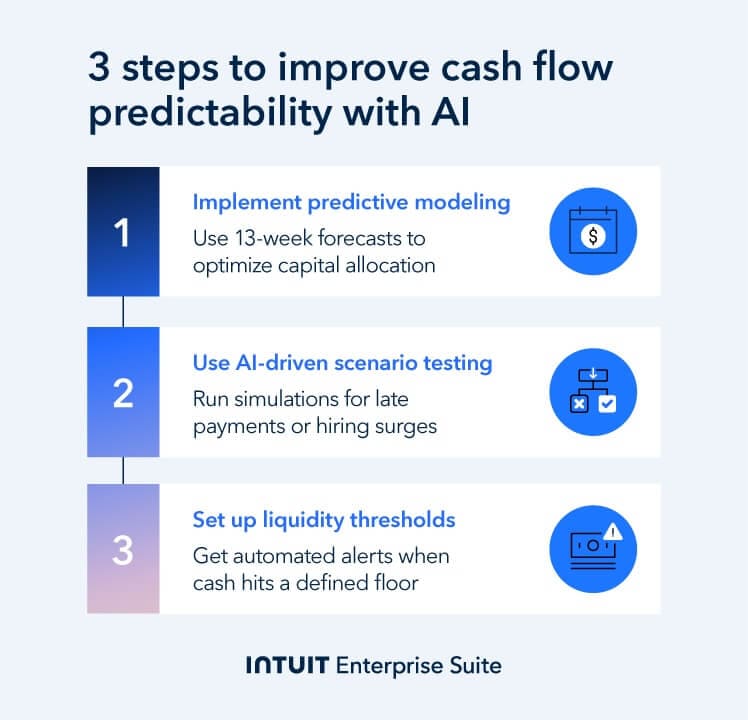
Here are three practical strategies you can use to improve cash flow predictability with AI:
Implement predictive modeling
AI-assisted cash flow forecast tools can base 13-week forecasts on 18 months to two years of your past financial data. This gives you tighter, short-term visibility on money in and out, based on the company's historical cash flow.
You can also influence forecasts by adjusting planned events, like a one-off vendor payment, missed milestones, and changes in payment date, to understand the timing effects on your cash position.
In addition, Intuit Enterprise Suite’s Payments Agent analyzes a client’s payment history and helps you set reminders and payment terms that fit how they tend to pay.
With greater visibility of incoming and outgoing cash, you can more confidently plan payroll and vendor payment timing, and make informed decisions on whether to invest or hold cash.
Use AI sales forecasting to be alerted to changes in expected billings during a cycle to determine whether to allocate more to marketing to boost orders.
Conduct automated scenario testing
EY found that only 28% of company forecasts were within 10% of their annual free cash flow targets. When forecasts are hard to rely on, setting a threshold gives you a clear line under which your minimum buffer must not drop.
With AI scenario planning, you can run simulations for common bottlenecks, like:
- "What if our top 3 clients pay 15 days late?"
- "What if we accelerate our hiring plan by one month?"
You can build these scenarios directly into Intuit Enterprise Suite alongside your baseline forecast.
This helps you decide in advance how to respond to each scenario (for example, pulling forward invoicing or slowing down hiring drives), so your forecast cash stays above your minimum buffer.
Set agentic liquidity thresholds
Deloitte’s Global Corporate Treasury Survey found that less than a quarter of firms rate their cash forecasting maturity as above average. To protect against forecast errors, many C-suites set a liquidity threshold that triggers a response before cash gets too tight.
In Intuit Enterprise Suite, you can set a “threshold” amount on your cash flow forecast. Set the floor at your minimum cash buffer, creating a clear alert across all your entities when overall cash levels drop too low.
Instructions: To set “threshold amounts” on your Intuit Enterprise Suite cash flow dashboard, select the AI forecasting toggle, open the Customize panel, and enter your Threshold amount.

How to implement AI forecasting in 5 steps
Moving away from manual forecasting to using AI requires consolidated, real-time, accurate data across entities.
Intuit Enterprise Suite brings your financial and operational data into one place, providing the native AI-driven forecasting needed to project cash flow without the friction of third-party FP&A integrations.
Here are five practical steps to set it up:
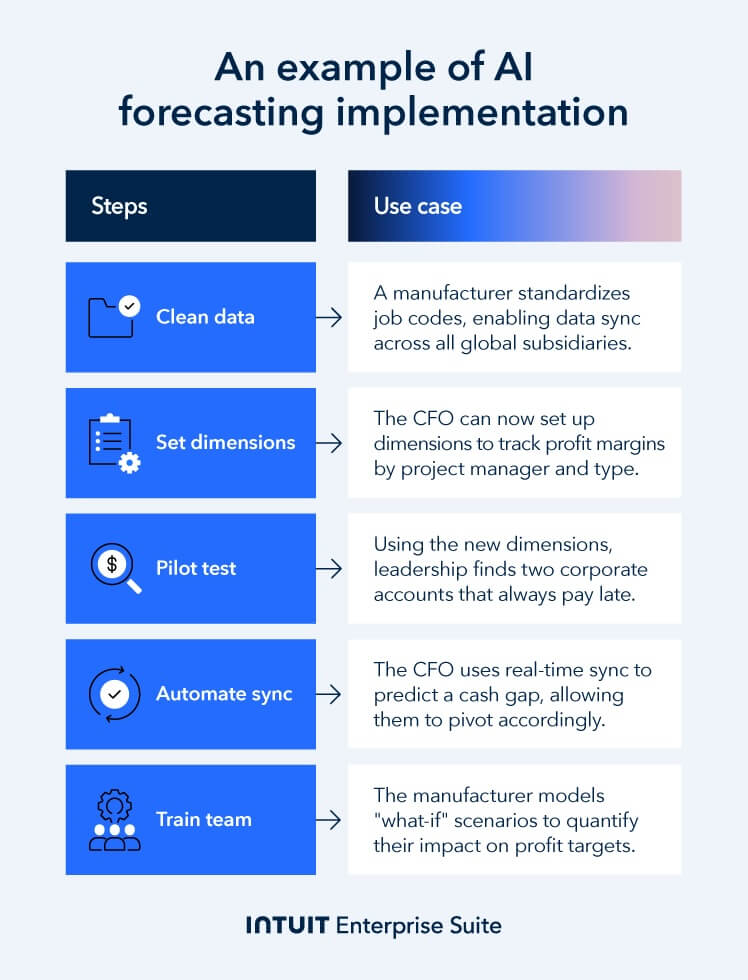
1. Centralize and clean historical data
AI forecasting is only as good as the data behind it. Companies need data that’s consistent across different entities to trust forecasts on margin and cash.
To achieve this, start by centralizing your financial and delivery data into one view. This consolidation means your forecasts use the same source of truth across key inputs like CRM pipeline, time tracking, billing/WIP, and bank feeds.
Your finance team now has one dataset to forecast across every entity. You can build up to 5 years of historical data in Intuit Enterprise Suite. Some "bolt-on" FP&A tools can struggle with this functionality due to integration lag.
But before rolling it out across all entities:
- Audit the last 3-5 years of financial statements and project logs to remove "noise" like one-time expenses, inconsistent coding or defunct service lines.
- Standardize how you format your data (like converting text-based currency entries to numeric values) to make it easy for AI agents to scan and process.
The more consistent your inputs, the more accurate your forecasts will be. It also becomes easier to trace a change in a forecast directly to a specific entity, service line, or project. You can then assign a team member to take action to prevent the impact from showing up before the end of the period or project.
Example: A manufacturer with three entities finds suppliers with multiple entries and subcontract labor across multiple expense lines in its subsidiaries. The central finance team standardizes suppliers and job codes, eliminating duplicates. The result is a greater margin and cash flow visibility in future forecasts.
Small changes in delivery dates and milestones can affect when you recognize revenue. Use automated revenue recognition software to keep your timing accurate as the contracts you work on move, extend, or get delayed.
2. Define forecasting dimensions
Define the dimensions that are necessary to trace write-down and margin risks to specific teams, service lines, or engagement types. For example:
- Identify profit factors by sub-categories like lead partner, office location, client sector, and engagement type (like retainers or milestones).
- Map current projects to “customer dimensions” to track performance by sector, project size, delivery method, or contract type.
- Prioritize dimensions that directly impact resource allocation, such as billable versus nonbillable roles.
Dimensions let you see exactly where the margin is leaking and where it’s coming from. You can work with the lead right away to reset the scope on the project before it turns into a write-down.
Example: The CFO of a construction firm steps in to set dimensions for job type, project manager, and in-house vs. subcontractor involvement. They quickly discover the types of projects that require the most write-downs and adjust pricing, scope, and staffing to protect profit targets.
Cloud ERPs offer many benefits, like dimension forecasting, but they’re often complex and costly to configure. Intuit Enterprise Suite supports forecasting by custom dimensions, like location, department, or project.
3. Launch a parallel pilot program
Run a parallel pilot so finance can validate how accurate forecasts are before you roll AI forecasting out across different entities. Here’s how:
- Run both your spreadsheet forecast and AI forecast side-by-side for a full 30-day cycle to evaluate and compare their relative accuracy.
- Start with high-data areas like Accounts Receivable “time-to-pay,” so you give the machine learning algorithms time to analyze and adapt.
- Note which risks AI alerts you to (like seasonal payment lulls, repeat late payers, client-specific delays) that the manual method missed.
Use the pilot to demonstrate the forecast's use cases. Intuit Assist drafts the forecast in Intuit Enterprise Suite, the finance team reviews it (adjusting where needed), and you use it to base decisions on.
4. Transition to continuous agentic updates
In multi-entity firms, rolling updates help finance teams see where the pressure on cash flow and margins is coming from before it shows up in the consolidated view.
Implementation tips:
- Turning on continuous sync from your bank feeds, billing/WIP, and CRM so forecasts refresh as inputs change in Intuit Enterprise Suite.
- Setting up “Threshold alerts” that notify you when forecast liquidity levels drop under the minimum buffer.
- Creating a workflow triggered by a threshold alert to suggest what finance reviews first, like billing timing or upcoming commitments.
Replace the static, regular forecasting model you used to use with a constantly-updated model to help you monitor and manage cash flow and margins daily.
Example: A manufacturer brings forward a new equipment purchase when their AI forecast shows the downtime, repairs, and energy costs of keeping the old machine running will strain cash flow and push margins off target.
5. Upskill your team from scorekeepers to directors
Use “what-if” scenarios to quantify the margin and cash impact of decisions like new hires or price increases before you commit. Train your team to run these tests using AI, now that automation has reduced the admin, copy-and-pasting, and rework involved in manual forecasting.
Some mid-market tools struggle with dimensional forecasting. Intuit Enterprise Suite lets you forecast by dimensions without requiring an ERP rebuild or a separate FP&A tool.
Act as the final “director” by reviewing, adjusting, and approving what Intuit Assist’s drafts. No matter how accurate Intuit Assist's output is, you maintain control, so there's always a human in the loop making the final call.
Example: Two overrunning jobs and higher-than-expected contractor costs prompt AI to forecast a margin write-off. To mitigate, finance raises cash by getting through the billing backlog faster, and ops switches to less expensive in-house workers instead of using contractors. This preserves capital, and gradually, the margin starts to move closer to the forecast.

When you schedule a demo, you agree to permit Intuit to use the information provided to contact you about Intuit Enterprise Suite and other related Intuit products and services. Your information will be processed as described in our Global Privacy Statement.
Boost productivity and enhance profitability
AI accounting and forecasting transform financial reporting from reactive, after-the-fact analysis to proactive management. Instead of spotting margin or cash flow issues at month-end, you get alerts while you still have time to take remedial action to preserve cash flow and protect profit margins.
Intuit Enterprise Suite has AI forecasting built in, so you can benefit from continuous forecasting without having to purchase separate FP&A software or manage a complex ERP integration. Contact us for more information, and use our calculator to work out your potential ROI with Intuit Enterprise Suite.
Check out upcoming events and learn more about Intuit Enterprise Suite.

Customer stories

Case Study
How FEFA Financial is growing with Intuit Enterprise Suite—without migrating to an ERP

Case Study
How this mission-driven, employee-owned company created efficiencies with Intuit Enterprise Suite
October 25, 2024

Case Study
Why this camping business chose Intuit Enterprise Suite over NetSuite
October 25, 2024

Case Study
Migrating to Intuit Enterprise Suite took 2 hours (with zero disruption) for this aspiring $50M revenue business
April 25, 2025

Case Study
Humble House Foods case study: How they improved visibility & simplicity using Intuit Enterprise Suite
September 24, 2025