Table of contents
Table of contents
For multi-entity firms, cash flow variance is rarely the result of a single factor; it is the product of timing gaps between payables, receivables, and intercompany transfers. Without real-time visibility into why actual cash positions deviate from forecasts, CFOs risk liquidity shortfalls that can stall operations or lead to missed investment opportunities.
Even in times of growth, performing a cash flow variance analysis is essential. QuickBooks’ Business Solutions Survey found that inadequate reporting and analysis are significant challenges preventing long-term growth for 45% of respondents.
Building your business and scaling upwards demands meticulous financial planning and analysis, and a cash flow analysis is just part of that process. This guide examines how to execute a precise cash flow variance analysis and how Intuit Enterprise Suite provides the cross-entity visibility needed to align actuals with projections.

What is cash flow variance analysis?
A cash flow variance analysis is a comparative analysis between a company’s forecasted cash flow and its actual cash flow. Unlike accrual-based profit and loss statements, which record revenue when it is earned, variance analysis focuses solely on the timing and movement of cash. This distinction is critical for enterprise leaders who manage liquidity across multiple entities.
To perform a variance analysis, take your forecasted cash flow for the period in question and compare it with the actual cash flow for that same period. Your cash flow variance (difference) is your forecasted cash flow subtracted from your actual cash flow.
Once you know how to calculate, forecast, and document cash flow, your focus should be on analyzing it to understand why a cash balance ends up higher or lower than predicted.
A meaningful analysis seeks to uncover the root cause that drove the difference so you can work toward correcting issues and making future forecasts more accurate. Precise, accurate analyses are critical to your financial success because they ensure you’re working with objective information and data.
The three kinds of cash flow variance
Cash flow deviations in your business can occur because of three different variables: volume, spending, and timing.

Volume variance
A volume variance in cash flow analytics defines the difference between forecasted and realized cash flow driven by sales performance or pricing assumptions for your products or services. This variance occurs when forecasted sales volume is higher or lower than expected, or when discounts given or taken differ from expectations.
A volume variance reflects a change in the *amount* of cash expected, not a change in *when* the cash is received. Differences in timing are analyzed separately as a timing variance.
In this scenario, a $20,000 shortfall in week one collections directly reduces the liquidity buffer available for week two obligations. For a CFO, this variance necessitates a review of receivables aging or credit terms to determine if the $20,000 is a permanent loss or a temporary timing delay.
Impact: Volume variances have a direct impact on how you understand the volume of your cash flow, but they are not irreparable cash flow issues on their own, and you can recover from and plan around these variances relatively easily.

While volume variances point to forecasting issues, they could also signal trends outside of cash flow analyses that are impacting your business’ growth.
Spending variance
A spending variance in your cash flow analysis is caused by operational spending deviations. This occurs when your actual payroll, rent, inventory costs, or discretionary spending are higher or lower than estimates in your forecast.
Continuing the cash flow analysis after week two closes, the analyst began looking ahead to week three using insights from week two’s variance analysis. Upon review, the analyst observed a spending variance in week two. The company spent more than it estimated due to an unexpected maintenance expense that impacted normal operations.
Impact: A spending variance can negatively impact your cash flow if your business is consistently spending more than is forecasted. It signals you aren’t accurately estimating your outflows.
Timing variance
A timing variance is when the difference between your actual cash and forecasted cash is a result of when the cash moved. This variance can occur regardless of transaction amount, and it’s the most critical error in liquidity planning.
Consider the week-one volume variance from the earlier example. That variance happened because a client didn’t pay on time. However, the client ends up paying in week four. Since this timing variance occurred, your week-two and week-three cash flow analysis were difficult to plan with, leading to a cash shortfall in week one and a surplus in week four.
Impact: A timing variance occurs when the total value of a transaction remains unchanged, but the actual cash movement happens earlier or later than projected. While these variances do not impact net profit, they create significant friction in short-term liquidity planning and working capital management.

3 steps to use variance analysis to drive corrective business action
Weekly routines that help you uncover and correct cash flow variances before they become bigger problems are vital to the success of your business.
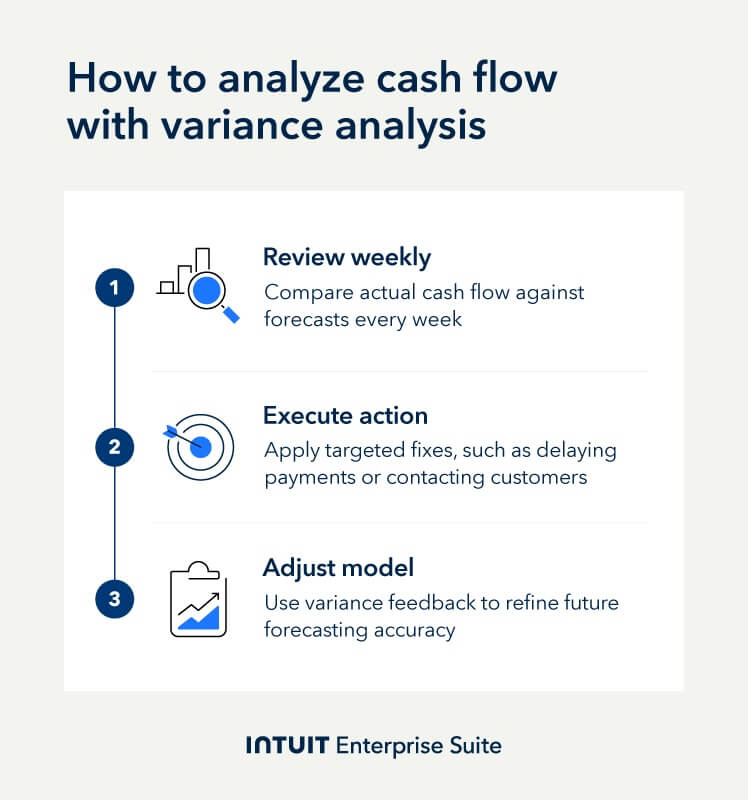
Step 1: Mandate a weekly review cadence
According to Forrester’s Total Economic Impact™ of Intuit Enterprise Suite study, the business value of better decision-making is projected to be $78,000 annually. Staying on top of fluctuations that impact your cash flow helps you make informed decisions. A mandatory, consistent review schedule will help you catch variances and shape how you resolve them before they evolve into crises.
A cash flow forecast is a living document that helps you shape real-time business decisions, but it and its subsequent analysis are not historical reports. However, you can use them to evaluate your company’s performance during a specific period.
End each week by reviewing your cash flow and comparing it with your forecast for the current and following weeks. This will enable you to proactively identify and adjust for any variances.
Step 2: Execute precise corrective action
You must make targeted decisions to resolve cash flow issues when you identify a variance in your weekly review. By addressing each specific type of variance with a suitable corrective action, you contain the issue before it impacts other areas of your cash flow projections.
To address a spending variance, adjust next week’s budget or delay non-critical payments to avoid overspending in the following week. For a timing variance, contact the customer responsible for the delayed payment to facilitate payment in the following week.
Corrective actions limit the negative cash weeks you experience, but these types of decisions are only possible when you have access to reliable, current data.
Forrester found that the real-time data capabilities of Intuit Enterprise Suite can save companies $257,000 over a three-year period, and time savings of up to 360 hours for CFOs. Quick access to your company’s financial performance is a valuable tool that can guide decisions that keep you cash positive each week.
A delayed payment in the following week is not a surplus, so it’s not a reason to increase that week’s spending.
Step 3: Close the feedback loop and adjust the forecasting model
Forrester found that better decision-making held a business value of up to $238,738 over three years. Awareness of variances alone won’t realize this value in your business without the decisions you make based on feedback from your analysis.
Variance analysis is a feedback loop, and an effective analysis should automatically refine future predictions in your cash flow model. Clear financial projections are a much more strategic tool when they’re consistent. If your model constantly underestimates how much you owe in payroll taxes, discover the root cause and make corrective adjustments to fix the model.
How to automate cash flow variance analysis with Intuit Enterprise Suite
Forrester projects over $1 million worth of total benefits from adopting Intuit Enterprise Suite. A large share of that projection can be applied to the cost-benefit of features that assist with a cash flow variance analysis. Intuit Enterprise Suite automates data entry and analysis with integrated account information. These features limit the need for time-consuming manual data entry and analysis.
Step 1: Compare actual vs. projected cash
The first step in variance analysis is identifying the delta between your cash-on-hand and your initial forecast. For multi-entity firms, this process is rarely straightforward; cash spread across various subsidiaries, jurisdictions, and bank accounts often obscures the true liquidity position.
How to execute:
1. Centralize data: Aggregate real-time bank feeds against your budget at the entity level.
2. Identify the gap: Calculate the absolute and percentage variance. A 5% variance in a $10M firm is a $500,000 shift that requires immediate investigation.
3. Eliminate manual manipulation: Instead of exporting raw data to Excel, use Intuit Enterprise Suite to compare actual bank balances with projected balances directly within your file. This removes the risk of manual entry errors and ensures your analysis is based on "live" data.
Forrester values better reporting and informed business decisions at up to $239,000 over three years. An integrated enterprise resource planning platform can instantly compare actual bank balances with projected balances directly within the accounting file. It makes cash reconciliation a simple process but also consolidates your data in one place so that you can make informed decisions.
As an integrated ERP, Intuit Enterprise Suite eliminates the need to export raw data, manipulate columns, and manually build comparison tables. This kind of value isn’t easily replicated elsewhere because the only alternative is manual data entry, which adds time to your payroll.
And if your manufacturing business has several accounts and clients, there will be a lot of inflow and outflow data moving through your accounts.
Step 2: Diagnose timing variance with AR aging
A timing variance occurs when revenue is earned but cash hasn't hit the account. Identifying these is critical for maintaining a healthy DSO and ensuring working capital remains stable.
How to execute:
1. Review the AR Aging Report: Cross-reference your variance against your aging buckets (30, 60, 90+ days). If the variance matches an outstanding invoice, the issue is collection speed, not a lack of sales.
2. Link delays to specific clients: Pinpoint which accounts are driving the delay. In industries like construction or manufacturing, a single late project payment can skew the entire month's cash flow.
3. Automate the remedy: Use Intuit Enterprise Suite to set automated reminders within the platform to help prevent the recurrence of timing variances from delayed payments.
You can target customers who typically pay late with automated reminders to reduce your days sales outstanding (DSO) and avoid recurring issues.
Example: A construction company with several projects and multiple clients may juggle multiple invoices, making it challenging to identify which client pays late. Intuit Enterprise Suite lets you review your accounts receivable aging report to see who’s past due. When you notice a timing variance, record the customer’s name, link the delay to them, and register them for automated payment reminders.
Don’t delay action when you observe variances. Act quickly so your customers know how serious you are about your cash management.
Step 3: Measure spending variance with class tracking
Spending variances occur when expenses exceed the budget. To make this actionable, you must be able to trace the overage back to a specific department, project, or location.
How to execute:
1. Tag expenses at the source: Use Class Tracking to assign every expense to a specific entity or department (like a specific hotel location or a manufacturing line).
2. Filter by custom fields: Apply custom fields to categorize spend by project manager or vendor type. This allows you to see if a variance is a company-wide trend or an isolated departmental issue.
3. Analyze: Determine if the overage was a one-time emergency spend or a recurring operational inefficiency. By using the reporting tools in Intuit Enterprise Suite, finance teams can reduce reporting efforts by 57%, allowing more time for this high-level strategic analysis.
Addressing variances immediately prevents minor liquidity gaps from compounding into year-end shortfalls.
Example: Suppose the finance operations team at your hotel finds a spending variance in a specific period. They can identify where the variance came from if your purchasing departments are tagged independently of one another using the Class Tracking feature. The Custom Fields feature enables your team to categorize purchases. It creates a unified report you can search through with ease.

When you schedule a demo, you agree to permit Intuit to use the information provided to contact you about Intuit Enterprise Suite and other related Intuit products and services. Your information will be processed as described in our Global Privacy Statement.
Boost productivity and enhance profitability
Manual consolidation often hides cash flow variances until it is too late to act. Intuit Enterprise Suite provides cross-entity functionality that lets you identify timing issues and liquidity gaps in real time. By centralizing multi-entity cash management, finance leaders can quickly diagnose whether a shortfall is driven by volume, pricing, or collection delays.
Grounding your projections in precise historical data strengthens audit readiness and reduces the borrowing costs associated with unexpected gaps. Backed by a Forrester TEI study showing a 299% ROI over three years, Intuit Enterprise Suite ensures finance teams maintain the control necessary to fund operations and scale with confidence.
Check out upcoming events and learn more about Intuit Enterprise Suite.

Customer stories

Case Study
How FEFA Financial is growing with Intuit Enterprise Suite—without migrating to an ERP

Case Study
How this mission-driven, employee-owned company created efficiencies with Intuit Enterprise Suite
October 25, 2024

Case Study
Why this camping business chose Intuit Enterprise Suite over NetSuite
October 25, 2024

Case Study
Migrating to Intuit Enterprise Suite took 2 hours (with zero disruption) for this aspiring $50M revenue business
April 25, 2025

Case Study
Humble House Foods case study: How they improved visibility & simplicity using Intuit Enterprise Suite
September 24, 2025