Table of contents
Table of contents
Key takeaways
- Flexible software integrations combine separate business solutions into one cohesive, easily modifiable system.
- These connections can reduce manual data entry, enhance real-time visibility, and extend the life and utility of core systems.
- ERP integration projects can be uniquely challenging due to data incompatibilities between tools, employee resistance, and limitations in legacy systems.
- The keys to successful ERP integrations include conducting a needs analysis upfront, prioritizing finance-to-operations connections, and thoroughly documenting integration architecture.
Disconnected systems force you to waste hours on manual data entry and reconciliation. According to the latest Business Solutions Survey, 43% of respondents cited integration with other apps and software programs as a top challenge with their current tech stack.
Flexible software integrations offer a robust solution that supports automatic data flows between virtually any system. In this guide, we’ll explore how they work, the most common types, and their benefits.
We’ll also explore the unique challenges you may face when integrating enterprise resource planning (ERP) systems, plus strategies for overcoming them.

What are flexible software integrations?
Flexible software integrations combine separate business software applications into one cohesive, modifiable system. Unlike older “point-to-point” integrations, which are custom-built and break when a single element is updated, they’re designed to be readily adaptable.
They rely on open standards—shared technical guidelines that enable different systems to be compatible. The most common example is an API (Application Programming Interface). It acts as a translator between systems, letting them exchange data automatically and accurately.
While these integrations reduce manual work and improve data flow, they can also introduce complexity around data governance, reconciliation, and control. This becomes more pronounced as the number of connected systems grows.
The 3 most common software integration types
Flexible software integrations take different forms depending on your systems' needs. Each serves as a bridge for transferring data, but the architecture behind that connection, and what it can handle, varies.
Here's how the most common types work.
API integration
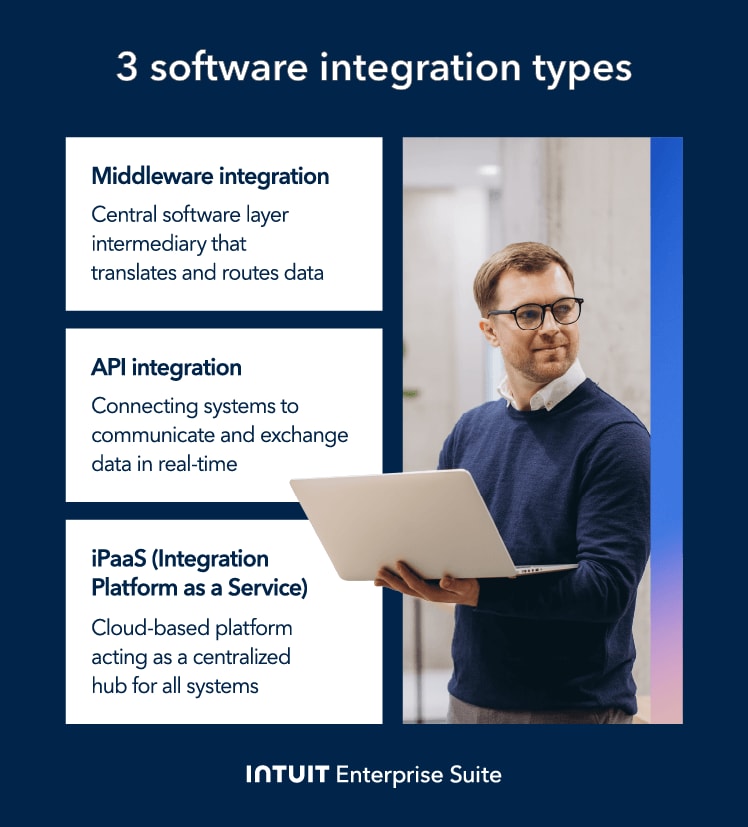
APIs are the connective tissue of modern software ecosystems: sets of rules that define how software components communicate, allowing for real-time data exchange. These contracts outline the types of requests systems can make of each other, the data formats they can use, and the responses they should expect.
According to the 2025 State of the API Report, 82% of organizations have adopted some level of an API-first approach, reflecting a broader shift toward treating APIs as foundational infrastructure for scaling operations and supporting more connected systems
Middleware integration
Unlike API integrations, middleware introduces a centralized layer that manages how data is translated and routed between systems. This shared layer coordinates data flows across multiple applications, rather than relying on a growing number of direct connections.
One of the most common types is the enterprise service bus (ESB): a structured communication hub for message transformation, routing, and protocol conversion. It's well-suited for complex environments where multiple systems, including legacy platforms, need to stay aligned.
iPaaS (Integration Platform as a Service)
iPaaS platforms provide a centralized, cloud-based approach to managing integrations across systems. Unlike traditional middleware, which requires on-premise infrastructure, iPaaS allows you to connect and manage integrations without maintaining underlying servers.
Migrating integrations to the cloud often offers several notable benefits, including a streamlined implementation process and increased scalability. It may also result in lower infrastructure and maintenance costs.

The global API market was valued at $21 billion in 2025, while the global iPaaS market was valued at just $10.5 billion.
However, the iPaaS market is projected to grow to over $71 billion by 2030, while the API market is expected to reach just $49 billion. This suggests iPaaS may overtake APIs in popularity.
Key benefits of flexible integrations
Flexible software integrations play an important role in maintaining long-term business agility. When paired with a unified system, they extend functionality across your tech stack without introducing unnecessary fragmentation. Here’s what they make possible and what that means for your bottom line.

Reduces manual data entry and errors
Manual data entry is time-consuming and leaves you vulnerable to human error. U.S. businesses lose an average of $28,500 per employee per employee annually to manual data entry tasks, and even small errors in financial records can have significant downstream consequences.
When your data sources sync automatically, that exposure disappears. This should significantly reduce the number of inaccuracies in your records due to simple mistakes.
Enhances real-time visibility
Flexible integrations ensure data consistency across connected systems, creating a unified source of truth that updates in real time. This visibility can help your team make faster, better-informed decisions.
When project management, inventory, and accounting records are always in sync, for example, it's much easier to coordinate material orders, flag budget variances early, and keep projects on track.
Extends the value of core systems (ERP/Finance)
Enterprise resource management (ERP) systems often become deeply embedded in business operations. Replacing them can be a massive undertaking—not to mention highly disruptive.
However, even the most reliable systems can become outdated over time. While those limitations may not justify a full system overhaul, they can still erode operational efficiency.
Flexible integrations are the key to extending the life and value of your existing systems. They allow you to gain modern functionality, such as a mobile interface or more advanced reporting capabilities, without replacing your core systems. This strategy directly translates into cost savings.
For example, delaying a full ERP replacement project, which often averages between $500,000 and $2 million, by even two years provides a massive, immediate return on investment for the integration effort.
Supports business scalability
As your business grows in size and complexity, its software needs will naturally evolve. For example, add an e-commerce storefront or implement a time-tracking tool.
Software makes this possible without having to replace or redesign your entire system. Their modular nature allows you to extend your tech stack as needed, though each addition still requires careful data mapping, testing, and governance to ensure accuracy and consistency.
Intuit Enterprise Suite includes over 850 third-party integrations that extend a unified financial core, helping reduce fragmentation while maintaining consistent, controlled data flows across systems.

ERP integration challenges
Despite the flexibility of modern software integrations, you’re likely to encounter challenges when connecting ERP systems. Let’s look at some of the most common issues so you can plan ahead. We’ll also explore practical solutions to help you overcome them.
Data incompatibility and transformation
Systems often format information, like dates, addresses, or currencies, in unique ways. Without proper mapping, those inconsistencies create errors that compound over time.
To avoid managing this manually, you can use Extract, Transform, and Load (ETL) pipelines within an iPaaS. Once configured, these automatically cleanse and map data according to pre-defined rules.
Example: Your business is integrating a new customer relationship management (CRM) tool with its legacy ERP, but they use different formats for customer ID numbers. You could use an ETL pipeline to convert the data from one format to the other before syncing.
Resistance to change and user adoption
Even when integrated business processes with ERP systems are more efficient, you may find that some resist adapting to the new way of doing things.
To avoid this, involve end users in project planning. This can help them feel more ownership over the transition and ensure their pain points are properly addressed.
Change management tactics, such as involving stakeholders early and offering thorough training, are often underutilized. According to the Panorama Consulting Group’s 2024 ERP Report, only about 31% of businesses report an intense focus on change management while implementing ERP systems.
Example: Your employees resist the expense reimbursement module in your new ERP, and you want to encourage them to embrace the transition. You might offer a workshop that demonstrates how its automation can save time and enable employees to get paid faster.
Intuit Enterprise Suite’s financial management software can also save employees time by automating accounting and finance workflows.

Managing legacy systems
Older, monolithic systems often lack modern APIs, making integrations difficult. Custom development or database-level connections can bridge the gap, but they're expensive, harder to maintain, and introduce security risk.
If you’re facing this issue, consider wrapping legacy functions with a modern API layer instead. Alternatively, you can use specialized integration tools designed to bridge the gap between old and new technologies.
Example: Your manufacturing company uses a decades-old ERP that’s unable to share inventory data with your new e-commerce platform. A modern middleware integration could provide a central software layer, securely connecting the systems and acting as a translator.
A roadmap for ERP integration
ERP systems connect with so many different aspects of your business that the prospect of integrating them can seem overwhelming. Here’s a practical, step-by-step approach to help bring some structure to the process.

1. Conduct a thorough needs analysis
The first step in ERP system integration is mapping where you are and where you need to be. This gap analysis involves auditing your existing systems and current data flows (your "as-is"), then defining how data should move between systems in an ideal state (your "to-be"). The gaps between those two states are your integration priorities.
Example: You find that after entering new sales orders in your CRM, your team transfers the data to your ERP system by hand before it can flow through to your accounting tool. This slows down fulfillment and increases the chance of errors.
You determine that it would be much more efficient to integrate the two systems so that data flow can occur without manual input. You could also use an AI-native ERP like Intuit Enterprise Suite to connect sales, operations, and accounting in a single, unified system.
2. Define the integration strategy (and budget)
Once you've identified which systems need to communicate, decide how you'll connect them. The right approach—direct APIs, iPaaS, or traditional middleware—depends on system complexity, budget, and how much the architecture needs to scale.
Example: You need to connect a legacy ERP with several newer systems, including a payroll system and accounts payable (AP) automation tool. In this case, an iPaaS solution may be the most appropriate.
Alternatively, Intuit Enterprise Suite unifies payroll, finance, and operations in a single ERP, with integrated APIs that reduce the need for fragmented systems.
3. Prioritize finance and ERP integration
ERP integration is rarely a one-and-done project, especially with complex or evolving systems. Start with the connections that matter most to your business's financial health.
Typically, integrations between finance and operations deliver the fastest ROI by minimizing manual work and keeping key financial data consistent across platforms.
The 2024 Business Solutions Survey found that companies spend an average of 25 hours per week on manual data entry and reconciliation, with 87% reporting negative effects on profitability and growth.
Example: You’re choosing between integrating your enterprise ERP software with an expense management tool or an e-commerce platform. Typically, the latter will be more valuable, allowing order and payment data to flow into your ERP and out to your accounting system.
4. Test, deploy, and document
Before full deployment, test rigorously. Validate that data flows accurately between systems and that performance holds under live conditions. And document your integration architecture, as clear records of data flows and system connections make it significantly easier to troubleshoot issues or scale as your organization grows.
Example: Before deploying an integration between a legacy ERP and Intuit Enterprise Suite’s bill payment tool, you’d want to verify that sales order updates in the ERP trigger invoices correctly in the suite.

When you schedule a demo, you agree to permit Intuit to use the information provided to contact you about Intuit Enterprise Suite and other related Intuit products and services. Your information will be processed as described in our Global Privacy Statement.
Flexible integrations create connected, efficient systems
Today’s flexible software integrations can combine separate business solutions into a cohesive, adaptable system. In addition to minimizing manual work, this lets you add new functionality as needed, extending the life and utility of existing tools.
If you’re looking to unify your data sources for financial analysis, Intuit Enterprise Suite brings these capabilities together in a single, AI-powered ERP—reducing system fragmentation while giving you the flexibility to connect the tools your business already relies on.
Schedule a call today to learn how its 850+ integrations can create connected systems that automate business processes.
Check out upcoming events and learn more about Intuit Enterprise Suite.
Customer stories

Case study
How FEFA Financial scaled up with Intuit Enterprise Suite (No ERP migration needed)

Case study
Case study: Fire & Ice transforms multi-entity challenges with Intuit Enterprise
October 25, 2024

Case study
Four Points RV Resorts review: Why they chose Intuit Enterprise Suite over NetSuite
October 25, 2024

Construction
Migrating to Intuit Enterprise Suite took 2 hours (with zero disruption) for this aspiring $50M revenue business
April 25, 2025

Case study
Humble House Foods case study: How they improved visibility & simplicity using Intuit Enterprise Suite
September 24, 2025
More product updates

Product update
What’s new in Intuit Enterprise Suite spring 2025
April 1, 2025

Product update
Intuit Enterprise Suite 2025 update: AI agents & automation enhancements
July 22, 2025

Product update
What’s new in Intuit Enterprise Suite November 2025: The AI-native ERP that adapts with your business
November 14, 2025