Table of contents
Table of contents
Late payments do more than disrupt cash flow; they act as a drag on enterprise agility. When capital is trapped in the invoice-to-cash cycle, organizations lose the ability to reinvest in R&D, fund strategic acquisitions, or hedge against market volatility.
For modern finance teams, the primary metric of this friction is Days Sales Outstanding (DSO). A high DSO indicates that liquidity is tied up in accounts receivable, weakening the balance sheet even when top-line revenue remains strong. According to a recent Business Solutions Survey, the challenge is often rooted in fragmented systems—some businesses spend an average of 25 hours per week reconciling data across apps.
This article outlines practical steps to reduce DSO and shows how to accelerate the invoice-to-cash cycle by leveraging integrated invoicing, payments, and automation within Intuit Enterprise Suite.

What is DSO?
Days sales outstanding is a key performance indicator that measures how long it takes for a company to collect payment after making a sale. It is a crucial component of the cash conversion cycle and is essential for assessing a company’s liquidity and overall financial health.
Understanding DSO helps businesses to identify patterns in their cash collection process and make informed decisions to improve operational efficiency and stabilize cash flow.
A high DSO can pose several challenges for a business. When cash remains tied up in unpaid invoices, the company may need to rely on credit or external borrowing to cover expenses, increasing interest costs.
It also raises the risk of bad debt, as the likelihood of non-payment increases the longer an invoice remains outstanding. In addition, high DSO makes cash forecasting harder, which can affect day-to-day operational planning and decision-making.
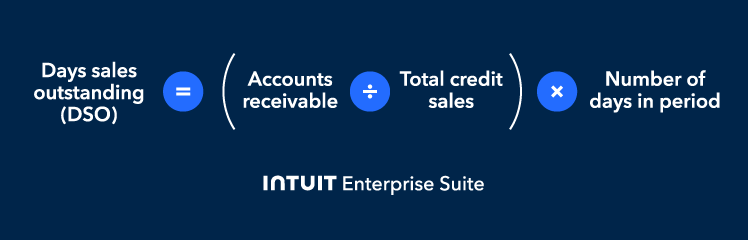
How to calculate DSO
DSO is calculated by dividing accounts receivable by total credit sales, then multiplying the result by the number of days in the period.
To calculate DSO, you need three inputs:
- Accounts receivable: This refers to the balance of money owed to the company by customers, specifically unpaid invoices pending collection.
- Total credit sales: These are the sales made on credit (not cash) during the measured period (e.g., a month, quarter, or year).
- Number of days: This refers to the number of days in the period being measured (e.g., 30, 90, or 365 days), depending on whether you’re calculating monthly, quarterly, or annual DSO.
In DSO finance, this formula helps track collections efficiency:
DSO = (Accounts receivable ÷ Total credit sales) × Number of days in period
For example, if a company has $100,000 in accounts receivable at the end of a 30-day month, and the total credit sales for that month are $500,000.
So, DSO= ($100,000 x 30) / $500,000 = 6 days
This means that, on average, it takes your company 6 days to receive a payment after a sale.
5 tactical steps to reduce DSO
So, how do you reduce DSO in practice?
If your company is struggling with a high DSO, there are practical steps you can take to bring it down and strengthen cash flow. The five tactics below combine everyday best practices with technology that makes it easier for customers to pay on time and for finance teams to collect payments on time.
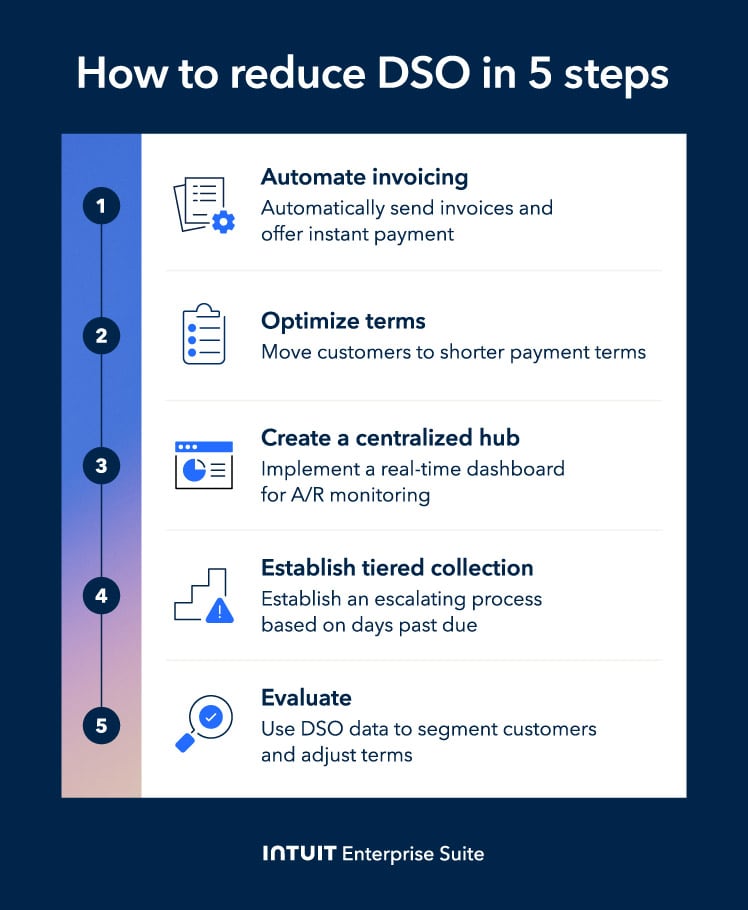
Step 1: Automate invoicing and offer instant payment
The fastest way to reduce DSO is to radically cut down on the time between service delivery and cash receipt. Manual invoicing is a major bottleneck; it causes delays because invoices are sent late, reminders are missed, and the payment process is often cumbersome for customers.
A structured business automation process directly addresses these issues by removing friction and accelerating the receivables cycle.
By automating your system, you can:
- Send invoices automatically the moment work is completed or services are delivered, eliminating delays.
- Trigger personalized reminder emails on a predefined, proactive schedule, ensuring no due dates are overlooked.
- Include a "Pay Now" button on the digital invoice, allowing customers to pay instantly using ACH or credit card with a single click.
When customers receive immediate invoices and can pay with one click, your receivables cycle is shortened.
While standard invoicing tools can schedule reminders, Intuit Enterprise Suite moves beyond static "set-and-forget" rules by introducing Agentic AI. This shifts the burden of monitoring from your finance team to a system of proactive intelligence.
AI agents can help your teams identify overdue accounts early, trigger follow-ups automatically, and resolve payment blockers faster.
A recent Billtrust study surveyed 500 finance leaders at large companies. The survey found that 99% of companies using AI-powered accounts receivable (AR) workflow saw a reduction in their average DSO, and 75% of those companies cut DSO by at least six days.
This simple tactic, which reduces invoice-to-cash time by nearly a week on average, can translate into faster cash flow, stronger working capital, and reduced reliance on external financing.
 Use automated reminders 7, 14, and 21 days after issuing the invoice. This keeps collections active and reduces manual tracking, without adding overhead.
Step 2: Optimize and enforce shorter payment terms
Industry-standard Net-30 terms are often too slow for businesses seeking healthy cash flow. Moving customers to shorter payment terms, such as Net-15 or Net-10, can accelerate cash collection and reduce the number of days your revenue sits unpaid.
For example, a mid-sized electronic manufacturer shifted from 60-day to 30-day payment terms, improving its net profit by 15% and reinvesting cash in product development sooner.
To implement this, start by transitioning customers to shorter base payment terms whenever possible. Then, incentivize immediate payment through early payment discounts.
A common structure is 2/10 Net 30, where customers receive a 2% discount if they pay within 10 days, or the full amount is due in 30 days.
On a $10,000 invoice with 2/10 Net 30 terms, you receive $9,800 on day 10 instead of $10,000 on day 30. That 20-day acceleration across all invoices can cut DSO from 45 to 32 days, freeing up significant working capital.
Step 3: Implement a centralized monitoring hub
To consistently reduce DSO, the finance team needs full visibility into receivables. A real-time view of overdue invoices, outstanding balances, and follow-up timing helps prevent cash-flow issues caused by missed or unnoticed delays.
They need a single, real-time dashboard to monitor AR status and collections activity across the entire organization. While many types of ERPs offer reporting, they often don’t surface receivables by customer, segment, or entity in real time.
Intuit Enterprise Suite supports this with A/R aging reports and dashboards that act as a central hub for monitoring DSO.
You can use these insights to:
- Track key metrics such as DSO by customer and by sales representative.
- Identify deteriorating payment patterns early.
- Assign follow-ups before invoices become overdue.
Example: Consider a multi-entity organization that replaces fragmented, manual processes with the unified automation of Intuit Enterprise Suite. By consolidating disconnected data into a single source of truth, the finance team can eliminate the 25 hours per week typically lost to manual reconciliation and move toward a streamlined order-to-cash cycle.
With real-time visibility across all subsidiaries and AI-driven workflows that proactively resolve payment blockers, the organization can achieve a significant reduction in DSO.
Step 4: Establish a tiered collection process
A structured, escalating collections process can help prevent overdue invoices from turning into long-term cash-flow problems. Instead of treating every late payment the same, finance teams can follow a consistent approach based on how long the invoice has been outstanding. This turns collections into an extension of risk management, beyond just administration.
A simple tiered structure looks like:
- Early-stage automations (1-30 days): Automate email triggers at strategic intervals, five days before the due date, and at 15 and 30 days past the due date. These friendly, templated messages handle routine follow-ups with minimal effort and keep invoices top-of-mind, providing customers with a frictionless way to pay.
- Mid-stage escalation (31-60 days): If you haven’t received payment, introduce human outreach. A brief phone call or SMS follow-up can identify common blockers such as approval delays or missing documentation. The objective is to resolve the issue and secure a confirmed payment date.
- Late-stage intervention (60+ days): At this point, communication should come from a senior account representative or finance lead. This conveys urgency while maintaining professionalism. Confirm next steps, agree on a payment date, and continue follow-up until payment is completed.
When reaching out, always ask what is causing the payment delay. Most overdue invoices result from administrative bottlenecks, so it’s not always just from a refusal to pay.
Finance teams can often accelerate payment by resolving missing information, aligning with approval timelines, or clarifying invoice details before escalating collections.
Step 5: Evaluate and adjust customer terms
DSO monitoring gives finance teams the insights needed to make strategic decisions and streamline cash flow. Data from a centralized dashboard should directly inform how you manage customer relationships and credit policies.
Use DSO data to segment customers based on their payment behavior. Look for patterns like:
- Customers who consistently pay late across invoices or projects
- Customers whose delays increase over time
- Customers who only pay after escalation
Once you identify late-payment behavior, adjust terms based on risk:
- Shorten payment terms for customers with a history of slow payment
- Require deposits or milestone payments before work begins for customers in higher-risk segments
- Move chronic late payers to upfront billing to protect cash flow and avoid repeated follow-up cycles
In cases where collections effort consistently outweighs the value of the account, it may be necessary to reconsider the relationship. Moving away from chronically late-paying customers can free up working capital, reduce ongoing follow-up, and improve cash predictability.

How Intuit Enterprise Suite streamlines A/R management
To reduce DSO, you need an integrated system that connects automation, visibility, and actionable insights across your entire accounts receivable process. Intuit Enterprise Suite provides a configurable platform that sits at the center of your A/R workflow, streamlining collections without the need for the rigid, high-cost implementations of traditional ERPs.
Here are some of the benefits Intuit Enterprise Suite provides:
Real-time aging and reporting synergy
For organizations managing multiple subsidiaries, the primary obstacle to reducing DSO is fragmented data. Intuit Enterprise Suite centralizes A/R health across your entire portfolio into a Multi-Entity Hub, providing a single source of truth that eliminates the need for manual spreadsheet consolidation.
Finance teams can access AR Aging Summary and AR Aging Detail reports directly from the Reports menu. These reports automatically categorize unpaid invoices by age—0–30, 31–60, 61–90, or 90+ days, making it easy to prioritize collection efforts.
Because invoicing, payments, and banking data exist in one system, payments automatically match to open invoices. This eliminates manual reconciliation errors and keeps data current.
The result? Finance teams work from a single, real-time view of receivables instead of juggling spreadsheets and multiple tools.
With Intuit Enterprise Suite, finance teams can run standard AR aging reports, including AR Aging Summary and AR Aging Detail, directly from the Reports menu.
These reports categorize unpaid invoices by how long they have been outstanding, such as 0–30, 31–60, 61–90, or more than 90 days, helping teams prioritize follow-up. Because invoicing, payments, and banking data live within the same ecosystem, payments are automatically applied to open invoices, reducing manual cash reconciliation and the risk of missed or duplicate entries.
As a result, finance teams no longer need spreadsheets or multiple tools and instead have a single, always current view of receivables.
Bottom-line benefit: Real-time AR visibility can lead to faster decisions, stronger forecasting, and more consistent collections, without the operational drag of manual reporting.
Automated payment and reconciliation integration
Faster collections are only part of the solution. To meaningfully reduce DSO, the payment information also needs to flow into your accounting records without manual work. Intuit Enterprise Suite supports this by connecting invoicing, payment processing, banking, and the General Ledger into a connected platform.
When customers pay via integrated digital invoices, Intuit’s AI-powered reconciliation automatically matches the transaction to the open invoice. This removes the "reconciliation lag" that often makes DSO appear higher than it actually is.
The benefits for finance teams include:
- Payments are applied to invoices without manual entry.
- Deposits are recorded accurately with fewer bookkeeping corrections.
- Bank fee discrepancies and duplicate entries are reduced.
- A/R aging and the General Ledger stay aligned in real time.
Data-driven customer segmentation
Even with strong invoicing and collections workflows, long-term DSO improvements require understanding customer payment patterns. Intuit Enterprise Suite enables finance leaders to adjust credit and collections strategies based on actual behavior, not assumptions.
Use Custom Fields and Project Tracking in Intuit Enterprise Suite to segment AR data by:
- Industry or customer size
- Sales channel or territory
- Account manager or sales representative
These insights enable strategic policy adjustments. Reliable payers may qualify for extended terms, while chronic late payers move to shorter terms or deposits. Finance teams can also identify systemic bottlenecks, such as delayed documentation workflows, and correct them proactively.
The result: more predictable A/R and efficient cash flow. Finance leaders focus attention where payment risk is highest, supporting lower DSO over time.

When you schedule a demo, you agree to permit Intuit to use the information provided to contact you about Intuit Enterprise Suite and other related Intuit products and services. Your information will be processed as described in our Global Privacy Statement.
Boost productivity and enhance profitability
Reducing DSO improves cash flow predictability and strengthens financial flexibility. With faster access to cash, companies can reinvest in growth, fund new initiatives, and evaluate returns more clearly in the context of long-term performance metrics such as NOPAT.
At the same time, automation reduces time spent on manual follow-ups, spreadsheets, and reconciliation. This frees finance teams to focus on higher-value work, such as planning, forecasting, and performance analysis. To see this in action, explore how Intuit Enterprise Suite helps reduce DSO and streamline financial operations.
Check out upcoming events and learn more about Intuit Enterprise Suite.

Customer stories

Case study
How FEFA Financial scaled up with Intuit Enterprise Suite (No ERP migration needed)

Case study
Case study: Fire & Ice transforms multi-entity challenges with Intuit Enterprise
October 25, 2024

Case study
Four Points RV Resorts review: Why they chose Intuit Enterprise Suite over NetSuite
October 25, 2024

Construction
Migrating to Intuit Enterprise Suite took 2 hours (with zero disruption) for this aspiring $50M revenue business
April 25, 2025

Case study
Humble House Foods case study: How they improved visibility & simplicity using Intuit Enterprise Suite
September 24, 2025
More product updates

Product update
What’s new in Intuit Enterprise Suite spring 2025
April 1, 2025

Product update
Intuit Enterprise Suite 2025 update: AI agents & automation enhancements
July 22, 2025

Product update
What’s new in Intuit Enterprise Suite November 2025: The AI-native ERP that adapts with your business
November 14, 2025