Table of contents
Table of contents
The appeal of an automatic payroll system is clear: streamlined employee payments. But it's more than just convenient—it's a vital tool for reducing manual work, bolstering data security, and minimizing costly errors.
Automatic payroll processing offers a more efficient and accurate way to manage employee compensation, making the initial investment worthwhile.
Intuit Enterprise Suite streamlines payroll by consolidating various functions onto one platform and integrating with tools like QuickBooks time tracking.
This automation translates to significant time savings for bookkeepers and C-level staff. Businesses typically lose over $70,000 during three years due to payroll inefficacies.
How automatic payroll processing works
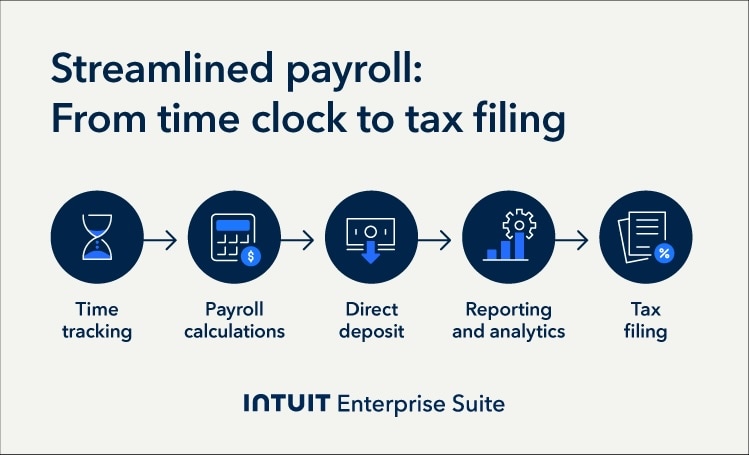
IES streamlines every aspect of compensation management, from time tracking to tax filing, improving accuracy and saving valuable time.
Time tracking and attendance tools
Integrated time-tracking and attendance features accurately record employee work hours, reducing errors common with manual entry. When paired with automated payroll software, these tools ensure precise payroll calculations and save administrative time.
Payroll calculations and tax management
Automated payroll systems calculate wages, deductions, tax withholdings, and benefits based on predefined rules and compliance requirements. It also automatically updates for changes in tax rates and labor laws.
Integrated time-tracking and attendance features let employees record work hours, including regular time, overtime, and leave, often syncing with biometric or mobile clock-in systems. This eliminates manual data entry, ensures accurate payroll, and reduces administrative time and the risk of penalties.
Direct deposits and payment processing
Direct deposit features streamline payroll transactions by eliminating physical checks, reducing processing time and administrative effort.
Employees receive timely payments directly in their bank accounts, improving overall satisfaction and reducing costs associated with check printing and distribution. This saves time and provides employees with convenient access to their funds.
Employee self-service access
Many automated payroll systems include self-service portals or apps, allowing employees to access pay stubs, tax documents, and benefits information. This enhances transparency, empowers employees to manage their payroll data, all while reducing the burden on HR and payroll staff.
Software integrations and data security
Integrating payroll software with HR, accounting, and enterprise resource planning systems eliminates data silos and reduces the need for manual data transfer, enabling efficient payroll management.
Robust security measures, including encryption and access controls, protect sensitive payroll information and ensure compliance with data privacy regulations.
Real-time reporting and analytics
Automated payroll systems generate real-time reports on payroll expenses, tax liabilities, and workforce trends, providing businesses with valuable insights to optimize strategies, forecast labor costs, and maintain compliance. These reports help inform data-driven decisions and improve workforce management.

Benefits of automated payroll
Automated payroll processing delivers numerous advantages, including increased operational efficiency, cost savings, reduced financial risks, and ensured compliance, contributing to a more financially sound and productive organization.
- Reducing human errors: Automation minimizes manual data entry, reducing miscalculations, discrepancies, and costly payroll mistakes.
- Time and cost savings: Streamlined payroll processing saves time for HR and finance teams, allowing them to focus on strategic tasks and reducing administrative costs.
- Enhancing compliance with tax laws: Automated systems stay up-to-date with tax laws and labor regulations, ensuring real-time compliance and preventing penalties.
- Improving employee experience: Employees benefit from timely pay, easy access to payroll records, and self-service tools for managing tax documents and benefits, improving satisfaction, morale, and retention.
Automated payroll is now essential for efficient, accurate financial management.

Manual vs. automated payroll processing
Manual payroll processing demands significant time and resources while increasing the risk of errors. In contrast, automation streamlines these processes, offering key advantages:
- Time and resource management: Manual systems require hours of data entry and calculation, while automated systems can process payroll in minutes. A typical 100-employee payroll that takes eight hours manually can take less than 30 minutes with automation.
- Accuracy and compliance: Manual calculations are prone to errors in tax withholdings, overtime, and deductions. Automated systems use built-in validation checks and current tax tables to ensure accuracy and compliance with regulations.
- Cost-effectiveness: Manual processing may seem cheaper, but hidden costs add up through errors, overtime, and penalties. Automation often pays for itself within a year by cutting labor costs and mistakes. Outsourcing payroll can also provide predictable costs and lower overhead.
- Scalability: Manual systems become increasingly difficult to manage as companies grow. Automated systems easily accommodate new employees, changing tax laws and multiple pay structures without additional effort.
 Document your current manual process for a month—track time spent, error rates, and correction cycles. This baseline data will help measure ROI and identify the most valuable features for your organization.

How to implement automated payroll processing
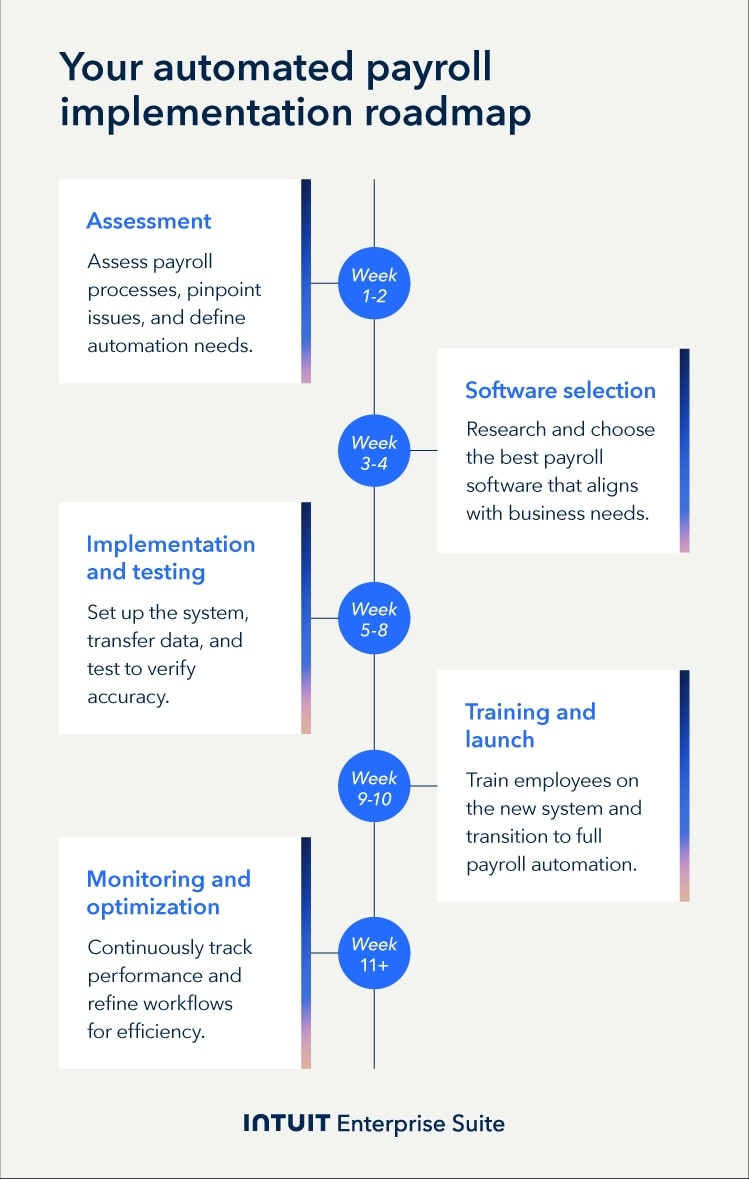
Switching from a manual payroll system to an automatic one involves careful planning and execution. To ensure a smooth transition, follow these essential steps.
Prioritize thorough testing and comprehensive training to ensure a seamless transition and maximize user adoption of the new system.
1. Assess your payroll needs
Evaluate your current payroll processes to identify inefficiencies, compliance gaps, and specific needs that automation can address. This includes the number of employees, pay frequencies, and any unique requirements.
2. Select the best payroll software for you
Choose a payroll solution that fits your business size, industry, and specific requirements. Make sure to consider factors like features, integrations, and scalability, and ensureit can grow with your business.
3. Transition to automated payroll
Successfully transitioning to an automated payroll system requires careful planning and execution. Follow these key steps to ensure a smooth implementation:
- Data migration: Import existing payroll data, including employee records, pay rates, tax information, and benefits, into the new system.
- System configuration: Set up payroll rules, tax settings, direct deposit details, and employee profiles to align with company policies and compliance requirements.
- Testing: Run parallel payrolls alongside the manual system to verify accuracy, identify discrepancies, and make necessary adjustments.
- Go live: Once testing is complete and any issues are resolved, fully implement the automated system, ensuring employees and payroll administrators receive training on its features.
4. Train staff and integrate HR systems
Train HR and accounting staff on the new system and integrate payroll with HR software to streamline processes and ensure seamless data flow between systems.
5. Ensure tax filing and compliance
Set up the payroll system to handle tax filings automatically, staying compliant with all reporting requirements and deadlines, minimizing the risk of penalties, and ensuring timely tax payments.
Best practices for automating payroll processes
When automating payroll, following these best practices can enhance efficiency, accuracy, and compliance.
- Data security and privacy measures: Implement robust security protocols to protect sensitive payroll data from breaches and unauthorized access.
- Employee data management: Maintain accurate and up-to-date employee records, including personal information, tax withholding preferences, and benefits enrollment.
- Software integrations with existing systems: Ensure the payroll system integrates with accounting, HR, and time-tracking tools to improve efficiency and data accuracy.
- Monitoring and continuous improvement: Regularly review payroll processes and system performance to identify areas for improvement and stay updated with technological advancements.
Boost productivity and enhance profitability
Automatic payroll processing offers significant advantages for your bottom line. From streamlined processing and reduced administrative overhead to minimized risk of errors and penalties–automated systems deliver efficiency and compliance.
Explore Intuit Enterprise Suite today and discover how it can optimize your payroll operations and contribute to improved financial control.
Automated payroll processing FAQ
Check out upcoming events and learn more about Intuit Enterprise Suite.
Customer stories

Case Study
How FEFA Financial scaled up with Intuit Enterprise Suite (No ERP migration needed)

Case Study
Case study: Fire & Ice transforms multi-entity challenges with Intuit Enterprise
October 25, 2024

Case Study
Four Points RV Resorts review: Why they chose Intuit Enterprise Suite over NetSuite
October 25, 2024

Case Study
Migrating to Intuit Enterprise Suite took 2 hours (with zero disruption) for this aspiring $50M revenue business
April 25, 2025

Case Study
Humble House Foods case study: How they improved visibility & simplicity using Intuit Enterprise Suite
September 24, 2025