Table of contents
Table of contents
While professional services profit margins have remained broadly stable at around 35%, EBITDA margins have fallen to 9.8%. Protecting your EBITDA requires deep visibility into how write-offs and overhead are depleting your returns.
However, when your organization’s data is siloed across separate systems and databases, the true cost to serve each client stays hidden until the period close. Client profitability analysis shows you which clients cover the cost of the service you deliver and which limit your profitability.
Below, find out how to calculate client profitability and the benefits of automating the analysis.

What is client profitability analysis?
When you lack transparency into what each client actually costs to service, pricing and renewal decisions rely on incomplete data. 54% of finance leaders either lack cost and profitability reporting or need more transparency in it. In professional services, where every engagement carries its own cost profile, that gap is particularly acute.
Client profitability analysis, also called customer profitability analysis, shows the return a client generates after you account for the true cost of doing the work for them. Beyond direct fees, this includes granular variables such as senior management time, specialized resource utilization, and shared overhead allocation.
So, a job that looks good on paper may not be as profitable as you first believed after you account for the time and overhead the client absorbs. Client profitability analysis gives you the data you need to spot the shortfall and reprice a project, reset the scope, or change staffing mix now, before contract renewal or accounting close.
To get that view, many firms use business intelligence software that connects project data, like time and expenses, to the general ledger. In complex enterprise environments, however, this insight is most effective when embedded directly within the core financial system.
Either way, using a BI tool to create a client margin view that traces back to the underlying transactions enables you to compare accounts on the same basis across teams or entities without rebuilding the numbers in spreadsheets.
You shift the discussion from debating how the margin was calculated to deciding what to do about it.
 Track indirect effort and billed fees, including non-billable time and overhead tied to serving the client. That gives you a truer view of client contribution, so pricing and renewal decisions are based on what the account really returns.
How to calculate profitability in 6 steps
Client profitability is only as accurate as the cost data behind it. Get the inputs wrong, and the output is a number nobody trusts.
The profitability formula is:
Client Profitability = Client Revenue − (Direct Costs + Allocated Overhead + Write-offs + Non-billable Time)
These six steps give you a repeatable method for getting that right:
1. Gather data
The first step is setting the standard for data hygiene. Require that every hour and every receipt link back to a specific client or project ID. If your data only goes as deep as department level, you end up estimating which clients paid for the time and which ones did not.
Start with these three inputs for each client:
- Fees billed and collected
- Time and expenses tied to the work
- Shared overhead
AI-native ERPs, like Intuit Enterprise Suite, unify siloed data from time-tracking apps, expense management systems, and CRM pipelines into a single platform.
With that baseline in place, you and your delivery leaders can use the same numbers when reviewing margin and work mix.
2. Allocate costs
Assign costs in a way you can justify and back up in a pricing review.
In job order costing, you allocate direct labor using the fully loaded cost, which is calculated as salary plus employer costs and benefits. Then you allocate indirect overheads like rent, software, and internal IT using a consistent basis, for example, time, headcount, or revenue share.
Pick a structure that works best for your business, like headcount by office in a multi-site firm, where rent and shared services are driven by space and people.
BI tools also allocate internal support time, like admin and legal, back to the clients, creating the workload. That stops high-maintenance accounts hiding inside "overhead" and gives you a fair basis for pricing and renewal decisions.
A defensible allocation gives you a margin number you can stand behind in partner discussions, so pricing and client mix decisions get made on data, not opinion.
3. Calculate profit margins
Start at the project level, then roll it up to the full client view. A client can look profitable on one project, but over the course of a year, their other projects can erode margins.
At the client level, profitability means revenue minus direct costs, overhead, write-offs, and non-billable internal time, because they all consume capacity.
Then compare As Sold to As Delivered. As Sold is the margin a quote or engagement letter implies, while As Delivered is the margin after you book all time and costs. The gap between the two shows what changed in scope, effort, or resourcing.
Work-in-progress (WIP) accounting also matters here, but it only holds up if your team records time and costs as work progresses.
Track As Sold to As Delivered data across every major engagement. Over a year, a pattern will emerge to show whether margin issues stem from pricing, scoping, or execution.

Review budget versus actual at least weekly on major engagements, not just at month-end. You spot overruns while the work is still live, so you can tighten the scope or adjust resourcing before the margin is gone.
4. Segment customers and develop an action plan
Segment by group using client profitability analysis in the following four ways:
- High profit, low maintenance: Protect and grow these accounts.
- High growth potential, currently mid-margin: Focus on growing the account and improving margin over time.
- High revenue, but margins reduced by favors and support: Reset the scope of work so there’s a greater chance the work pays back more.
- Low margin, high resource drain: Move to a standard package, reduce custom work, set tighter service levels, or exit the account.
Create an action plan to focus time and investment on clients that already generate, or could generate, a healthy margin. Then set new terms, a new service level, or an exit plan to address clients who impact your profitability.
Psychological pricing can be particularly helpful for the third group. If you know which clients trigger many small requests, you can use clearer packages, options, and minimum fees to steer behavior and protect margins.
5. Continuous reassessment
Client profitability shifts as engagements evolve, so review client health scores quarterly to catch drift before it becomes a year-end loss.
Build a simple scorecard for that review using dimensions, like margin trend, scope changes, and non-billable internal time. This helps you spot clients where effort is rising while fees stay flat.
Rather than revealing slippage after a project closes, AI-assisted forecasting analyzes current run rates against historical project patterns to flag potential budget overruns while work is in progress. That gives you time to tighten terms, adjust resourcing, or reset expectations before the loss is locked in.
That keeps you ahead of the conversation at renewal, with the data to reprice the contract, restructure the deal, or walk away.

The benefits of automating client profitability analysis
Manual client profitability analysis can work well when you have a small number of clients. But once you run dozens of projects across multiple entities, the complexity of tracking time, expenses, and shared overhead increases sharply. The numbers take longer to produce and are harder to trust.
Automating client profitability analysis delivers the following benefits:
Real-time alerts and predictive intervention
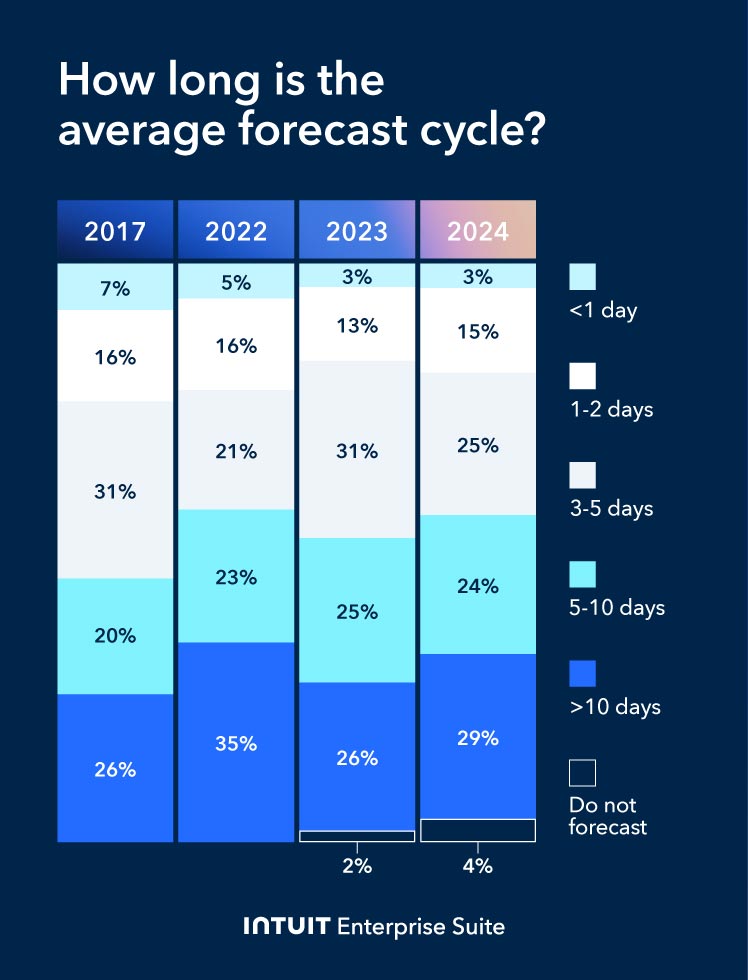
When project costs start to drift, not detecting it until later on often results in a write-off or a difficult conversation with a client. The FP&A Trends Survey found that only 18% of organizations produce a forecast within two days, while 53% take more than five days.
This is basic risk management in the construction sector, where you watch cost and progress early because late detection leaves few options. The same applies in professional services when a fixed-fee engagement starts to run hot.
Intuit Enterprise Suite lets you automate workflows by setting conditions and notifications for project invoicing, budget approvals, financials, and delays. These alerts provide the "early warning system" that a contract needs renegotiation before the margin on it is completely eroded.
You step in earlier, tightening the project scope or adjusting the staffing mix while there's still margin to protect.
Enterprise visibility without the cost of a traditional ERP
Intuit Enterprise Suite avoids the "ERP tax" of long implementation cycles, complex data migrations, and ongoing maintenance costs. Ninety-five percent of customers go live in less than 30 days without the need for a separate BI tool.
For multi-entity firms, this is what enterprise accounting should feel like. You see group performance and drill into the details without rebuilding reports across systems.
The platform stores and continually updates project and financial data, delivering “speed to insight” through the reporting and dashboard functions. You stop waiting for manual exports and data refreshes from individual systems. That means fewer reporting rebuilds during the month and fewer decisions held up by old numbers.
Forrester’s TEI study projects a 299% ROI and about $447k net present value over three years for a composite organization using Intuit Enterprise Suite at a mid-range level.
When making the case internally, you demonstrate the value of faster decisions during the month, backed by a board-ready ROI from Forrester.
Automated cost allocation
When finance teams spend most of their time compiling numbers instead of analyzing them, the cost shows up in delayed decisions. The FP&A Trends Survey found that data collection and validation still take up 45% of FP&A time. Automation reduces the administrative burden on the finance team.
That frees your team to interpret the numbers rather than assemble them. It also greatly reduces the risk of human error and the costs associated with allocating indirect overhead and shadow costs, like software seats, AI credits, shared admin time, and internal IT support.
Instead of rebuilding the split in spreadsheets each month, you set the logic once, and the system applies it every period. That keeps client net margin consistent from month to month, because the same rules run every time.
Intuit Enterprise Suite distributes costs across projects using pre-set rules, such as percentage of sales, expenses, or assets, and applies those rules across entities. Net margin stays accurate because the same allocation runs every period. Allocations also stop being a month-end job, which takes days off of the close process.
Streamlined revenue recognition
Revenue recognition in professional services is rarely as simple as “invoice sent, revenue recorded.” Fixed-fee engagements, milestone contracts, and retainers all create timing differences between work performed, billing, and earned revenue.
Construction contracts have the same issue. Work happens over time, billing follows a schedule, and cash arrives before or after the work is done. That is why timing matters when you measure profit during the month, not just after it.
Automated revenue recognition aligns earned revenue with project milestones or value-based delivery, so you get a true view of actual performance. You see revenue schedules update as projects progress, so month-end closes become sign-offs, not manual rebuilds of what your company earned versus what it billed.
Top challenges in client profitability analysis
Even with the right tools, finance leaders need to plan for operational challenges connected with client profitability analysis.
Three of the most important issues are:
Getting real-time data
When you only get a full view after month-end, you find problems late. If the close takes around 15 days, your “latest” numbers may already be two weeks old by the time you see them.
Example: A multi-entity contractor runs four sites at once. On a job with agency labor, timesheets come in late and get coded to a holding cost center. Equipment rental invoices land in accounts payable with no job code and stay unposted until someone chases the site manager.
The job looks on budget during March. By the time the costs are coded and posted in mid-April, the overrun is locked in, and the variations window has passed.
Reconcile key accounts throughout the month using a close checklist rather than waiting until the final week. You shorten the close and reduce late surprises, so “latest numbers” means current enough to act on.
Saying no to clients
Some clients look profitable until you count the cost to serve them. When you can show the fully loaded margin, you can back a tough call with numbers. That gives you a clean choice. Reprice, change the service level, or exit.
Example: A serviced apartment operator takes a relocation agency as a key referrer. Occupancy is high, but guests churn weekly, and support requests are constant. Cleaning turns are heavy, maintenance gets pulled forward, and the ops team spends hours on keys, Wi-Fi, and refunds.
The headline revenue looks great, but the fully loaded margin is thin or negative. Data gives you the confidence to tighten terms or stop taking those bookings.
Accurate budget forecasting
In 2026, a static budget can be wrong within weeks. A rolling forecast updates the plan with current costs and demand, so margin and cash expectations stay realistic. That makes it easier to set pricing, hiring, and spending with the numbers you will actually land.
Example: A manufacturer prices work assuming a steady power cost and a normal overtime pattern. In February, energy rates go up, and they have to raise key staff's wages to prevent them from leaving. Cost per unit rises that week, but the budget still shows the old cost base.
Without a rolling forecast, Sales keeps quoting last quarter’s numbers, and Finance only sees the margin squeeze after month end. With a rolling forecast, the CFO can update cost assumptions and reset pricing and volume targets while the quarter is still live.

When you schedule a demo, you agree to permit Intuit to use the information provided to contact you about Intuit Enterprise Suite and other related Intuit products and services. Your information will be processed as described in our Global Privacy Statement.
Boost productivity and enhance profitability
Client profitability analysis is most useful when it changes what you do next. Start by choosing a handful of key accounts, agreeing on the cost rules, and reviewing margin through the month so you can act while the work is still live. That turns profitability into a working tool for pricing, resourcing, and client decisions, not a year-end report.
Learn how Intuit Enterprise Suite helps you measure and manage client profitability in one place, with reporting you can act on during the month.
Check out upcoming events and learn more about Intuit Enterprise Suite.

Customer stories

Case study
How FEFA Financial scaled up with Intuit Enterprise Suite (No ERP migration needed)

Case study
Case study: Fire & Ice transforms multi-entity challenges with Intuit Enterprise
October 25, 2024

Case study
Four Points RV Resorts review: Why they chose Intuit Enterprise Suite over NetSuite
October 25, 2024

Construction
Migrating to Intuit Enterprise Suite took 2 hours (with zero disruption) for this aspiring $50M revenue business
April 25, 2025

Case study
Humble House Foods case study: How they improved visibility & simplicity using Intuit Enterprise Suite
September 24, 2025
More product updates

Product update
What’s new in Intuit Enterprise Suite spring 2025
April 1, 2025

Product update
Intuit Enterprise Suite 2025 update: AI agents & automation enhancements
July 22, 2025

Product update
What’s new in Intuit Enterprise Suite November 2025: The AI-native ERP that adapts with your business
November 14, 2025