Table of contents
Table of contents
Managing multi-entity financials—from intercompany reconciliation to audit compliance—can quickly become a bottleneck to growth. When your data lives across disconnected systems, maintaining forecast accuracy and audit readiness becomes harder to sustain.
Enterprise Resource Planning (ERP) software gives you the operational and financial foundation to stay in control. Instead of relying on fragmented systems, you can unify financial and operational data across your organization and maintain real-time visibility into performance—enabling your team to identify issues earlier and make informed decisions in real time.
In this article, we’ll break down the different types of ERP based on deployment type and business size, explore the core features, and help you determine which ERP structure best supports your business
Type 1: On-premise ERP
Best for: Businesses that require full ownership and governance of infrastructure and data, particularly in highly regulated or security-sensitive environments.

This ERP type gives your business complete control over its software, hardware, and stored data by storing everything on-premise, rather than in the cloud or at an off-site location. For finance leaders in industries where data control is non-negotiable, this model allows you to set security standards and maintain full oversight of the system environment.
The pros of on-premise ERP include:
- Data sovereignty: You maintain full autonomy over your software, hardware, and data.
- Scalability: The system can be scaled up or down as needed to accommodate changes in business requirements.
- Customization: On-premise ERP can be highly customized to fit specific business processes and workflows.
The cons of on-premise ERP include:
- High initial investment: Implementing an on-premise ERP system requires a significant upfront investment in infrastructure.
- Ongoing maintenance costs: Maintaining an on-premise system involves ongoing costs for upgrades and updates.
- Limited accessibility: Access to the system is typically limited to employees within the company’s physical location.
Because the infrastructure is hosted internally, you’ll typically need dedicated IT resources to manage ERP deployment, system maintenance, and long-term administration.
Many industries use this type of ERP infrastructure, including:
- Finance
- Healthcare
- Government entities
- Manufacturing
A bank is one example of a business that would benefit from an on-premise ERP solution. Having everything on-site helps financial institutions protect sensitive data, comply with regulatory requirements, and process transactions in real time without the potential delays of cloud-based systems.
While the industry is shifting toward hybrid models, roughly 58% of banking ERP revenue is still tied to on-premise installations, reflecting the sector’s continued focus on data sovereignty and infrastructure control.
Type 2: Cloud ERP
Best for: Businesses prioritizing faster deployment, system flexibility, and easier scalability across teams, entities, or locations.

Unlike an on-premise ERP, a cloud ERP is not hosted on-site. Instead, the platform is hosted and maintained by a third-party provider rather than internal infrastructure. This means you can access these ERP systems online rather than installing hardware on-site. Organizations that benefit most from cloud ERP include:
- Distributed and remote-first teams
- Multi-entity or multi-location organizations
- Businesses reducing infrastructure overhead
The pros of cloud ERP include:
- Accessibility: Your teams can access financial data and operational workflows from any location with an internet connection.
- Maintenance-free: The vendor handles maintenance, storage, security, and upgrades.
- Cloud-based: No need for on-premise hardware or software.
The cons of cloud ERP include:
- Internet dependency: Requires a reliable internet connection.
- Vendor control: Dependence on the vendor for updates and support.
- Data security concerns: Potential security risks associated with cloud storage.
With cloud ERP, you get the core accounting features and financial management capabilities most organizations need, with functionality that scales as the business grows.
Cloud-first ERP solutions are currently the deployment choice for 75% of businesses, according to a recent Panorama survey. Because cloud platforms reduce infrastructure overhead while supporting expansion across teams, locations, and entities, many organizations adopt them when modernizing legacy systems or scaling operations.
Type 3: Hybrid ERP
Best for: Businesses with an existing on-premise ERP looking to transition to a cloud ERP, or businesses needing a mix of control and flexibility.
A hybrid ERP combines on-premises and cloud-based infrastructure, giving you control over sensitive data and processes while leveraging the scalability and accessibility of cloud systems. Industries that commonly adopt hybrid ERP include:
- Financial services
- Healthcare
- Manufacturing
- Government agencies
- Large retailers
The pros of hybrid ERP include:
- Data control: You maintain control over their most sensitive data and processes.
- Security: Data stored on-premise can have more stringent security measures.
- Leverage existing infrastructure: You use your on-premises infrastructure as it expands or transitions to cloud-based services.
The cons of hybrid ERP include:
- Complexity: Managing both on-premise and cloud components can introduce complexity.
- Integration challenges: Ensuring seamless data transmission and integration between the on-premise and cloud environments can be challenging.
- Vendor lock-in: Reliance on a third-party cloud provider can create vendor lock-in.
If you have an existing on-premise ERP, the hybrid model provides a structured path to cloud adoption without requiring a full system replacement.
Hybrid solutions are the go-to for many large enterprises, including companies like Walmart, Coca-Cola, and McDonald’s. In fact, a recent Gartner report estimates that 90% of businesses will be using a hybrid infrastructure by 2027.

Types of ERP systems by size
Another way of categorizing ERP systems is by business size. Understanding where your organization falls helps narrow the field significantly—the right ERP for a 50-person firm looks very different from what a multi-entity enterprise requires.
Midmarket ERP
Best for: Growing multi-entity firms that require enterprise controls without the full cost or complexity of an enterprise ERP.

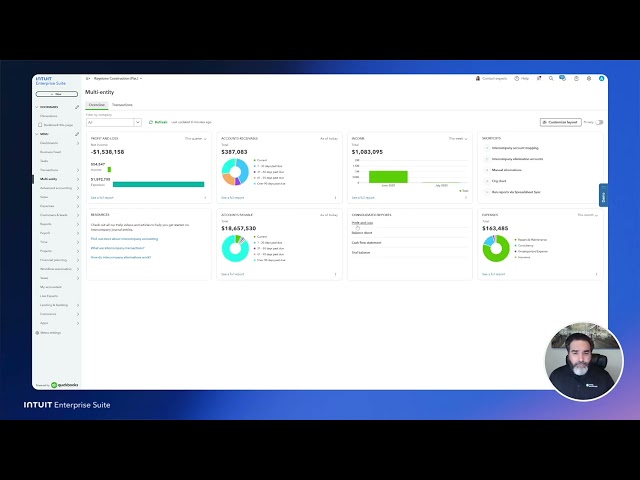
Midmarket ERP solutions are a critical next step if you’ve outgrown your current accounting solution and are evaluating proper ERP-class tools.
If you’ve reached the limits of tools like QuickBooks Online Advanced or QuickBooks Desktop, this is typically where midmarket ERP solutions come into play.
This is best suited if you have a workforce between 100 and 1,000 employees that need to integrate multiple business functions—sales, HR, and general operations—while adding deeper financial control across multiple entities.
A midmarket ERP can help companies:
- Identify areas across the company for improvement
- Streamline order processing and inventory management
- Improve efficiency and reduce operating costs
These common ERP systems can accommodate rapidly growing companies and can be customized for specific industries like retail or healthcare. Midmarket ERPs are built for organizations that need enterprise-grade financial controls, such as multi-entity visibility, consolidation, and reporting, without the implementation burden and complexity of traditional ERP systems. They still require a meaningful IT investment to operate effectively.
 With midmarket ERP options, focus on prioritizing industry-specific needs. These solutions can be tailored to your business sector, making them work for you. In 2023, 65% of businesses opted for a customized ERP.
Enterprise ERP
Best for: Large companies with complex operations and extensive IT resources.

An enterprise-level ERP is designed to support large-scale operations, often with thousands of employees and complex global footprints. These systems are built to handle deeply complex processes across finance, operations, and supply chains.
Enterprise ERP can help companies:
- Integrate several high-level business functions like accounting, finance, sales, and operations.
- Easily comply with industry standards.
- Provide consolidated visibility across entities, regions, and operational units.
As your operations scale, complexity tends to concentrate in specific areas—multi-entity management, complex revenue recognition, project-based accounting, or global supply chain coordination. These are the breaking points that push organizations toward enterprise-grade ERP.
What sets this ERP solution apart is its reach across geographic regions, supply chains, and business units simultaneously. That breadth requires and enables deep customization, but also introduces longer implementation timelines, higher costs, and ongoing system management overhead.
Since ERP implementation requires employee and stakeholder buy-in, remember to communicate often and early about ERP evaluation, selection, and deployment. More than half of businesses considering a new ERP system expect the decision to take six months or more
Industry-specific ERP systems
Many ERP platforms include a broad set of modules covering core business functions such as accounting, payroll, human resources, and customer relationship management.
However, the operational priorities of each industry often determine which capabilities you may rely on most.
For example, a manufacturing company may prioritize production planning and supply chain coordination, while a retailer may focus more heavily on inventory visibility and pricing management.
- Manufacturing ERP systems should focus on purchase order management, production planning, subassemblies and parts management, and advanced inventory features.
- Retail ERP systems should have features for easy pricing management, integrated inventory management, customer relationship management, and customer and business intelligence.
- Healthcare ERP systems must focus on patient management, clinical workflow management, human resources, and regulatory compliance.
- Financial Services ERP systems should include features dedicated to accounting, risk management, data privacy, and wealth management.
- Nonprofit ERP systems should be calibrated for compliance, offer advanced donor management, and meet high data security standards.
By prioritizing adaptability and ecosystem connectivity, you avoid the constraints of a rigid system. A scalable solution like Intuit Enterprise Suite gives you multi-entity visibility, consistent controls, and a financial foundation that scales without sacrificing accuracy or oversight.
How to pick the right ERP system
Different types of ERP systems have pros and cons, and not every ERP solution is best for every business.
Before deciding on a new business management software, consider:
- The complexity of your entity structure, including multi-entity consolidation and intercompany workflows
- The depth of financial controls, reporting capabilities, and audit readiness
- Total cost of ownership, including implementation, ongoing support, and expected return on investment
- Implementation timeline and the internal resources required to support it
- Integration requirements across existing systems and operational workflows
- Scalability as your organization grows, restructures, or expands across entities
Evaluating these factors carefully can help you select an ERP solution that supports both current operational needs and long-term growth.
The core ERP modules
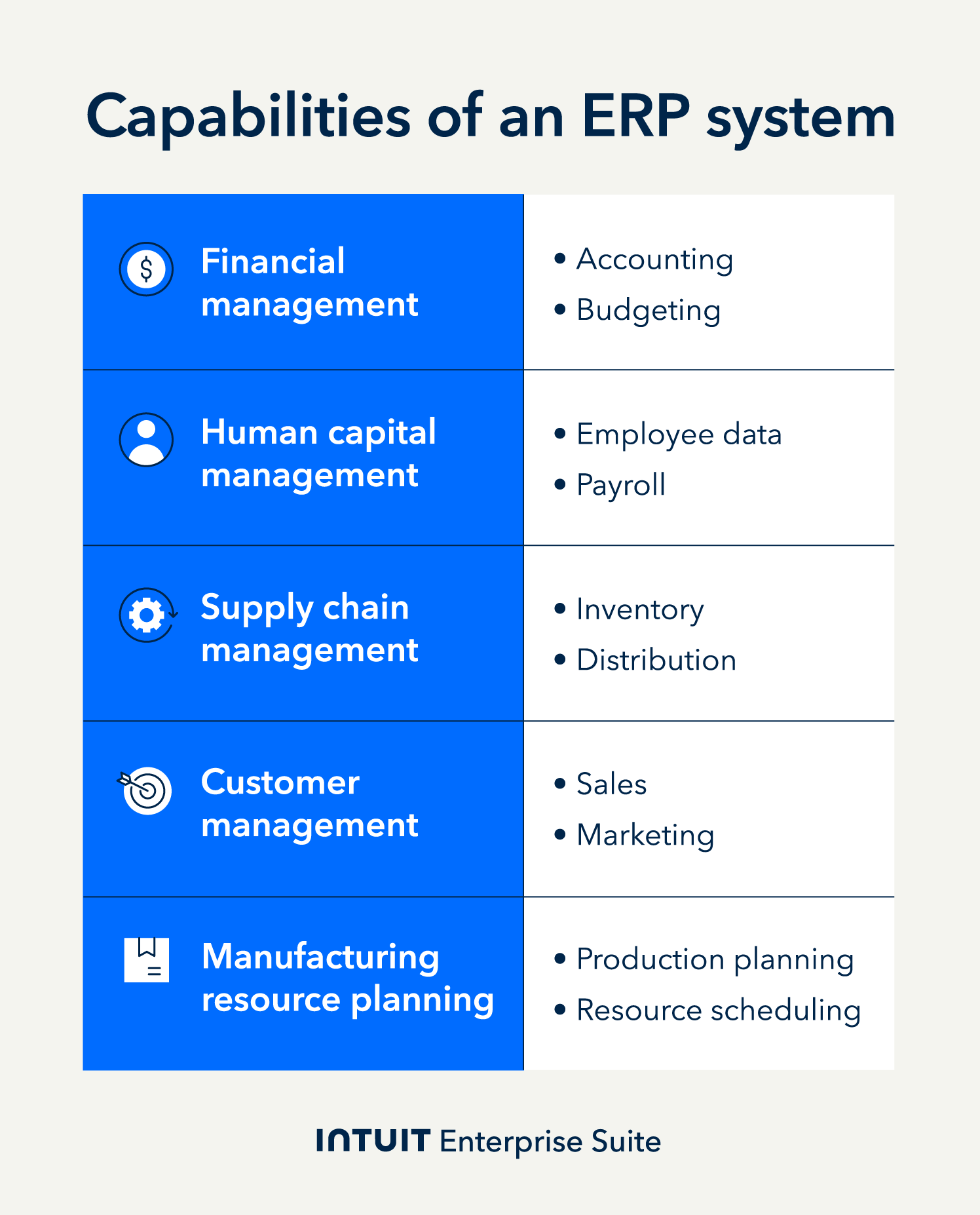
A defining advantage of ERP systems is the consolidation of business functions into a single, integrated platform. From managing accounts receivable and marketing to tracking attendance and stock levels, ERP software provides centralized access to all your business data and processes.
While you can customize your ERP to your business needs, it will primarily support these four core areas—either through built-in functionality or by integrating with specialized tools.
Financial management
Accounting and financial management are some of the most crucial aspects of an ERP system. According to a SelectHub survey, accounting was the top feature businesses sought when selecting ERP software. This is unsurprising, considering your ERP can automate many of your financial processes, such as cash management, forecasting, and accounts payable and receivable.
Which financial features are available will depend on the ERP you choose. Smaller ERP systems, or those that are industry-specific, will have basic tools for managing general ledgers, budgeting, and reporting. But larger, more customized ERPs may have additional tools and resources that CFOs require.
These tools may include:
- Multi-entity accounting and consolidation
- Advanced revenue recognition
- Risk management and compliance reporting.
- High-level financial forecasting.
Human resources
From payroll to attendance, ERP systems can be a useful tool for meeting HR business needs. You can automate time-clock tracking, reduce payroll errors, and quickly manage employee benefits. This can easily save your business time and money. In fact, 37% of businesses surveyed by QuickBooks already use HR or payroll software. However, if your business needs advanced HR tools, using a human capital management (HCM) application alongside an ERP may be the best solution.
Customer relationship management (CRM)
A business depends on its customers, and managing this relationship is key.
With an ERP system, CRM capabilities can help a business:
- Track marketing campaigns
- Evaluate sales performance
- Provide customer service and support
- Manage customer data
Small business ERPs may include built-in CRM tools, while larger ERP solutions often integrate with dedicated CRM platforms, syncing customer and financial data.
This integration enables your CRM and ERP to share data, providing a more complete view of customer activity and revenue.
Supply chain management (SCM)
Second only to accounting, inventory management and related supply chain elements are key features in any ERP system. From managing stock levels to tracking shipments, SCM tools can help you reduce inventory costs, eliminate production bottlenecks, and improve quality control.
Which SCM features are available will depend heavily on the type of ERP you choose. For instance, a manufacturing-focused ERP will typically include advanced tools for evaluating product quality and compliance, managing your warehouses, and material resource planning (MRP).
More than 60% of organizationsrealized benefits with inventory levels after implementing their ERP solution, confirming superior inventory optimization.
The three key data types in ERP systems
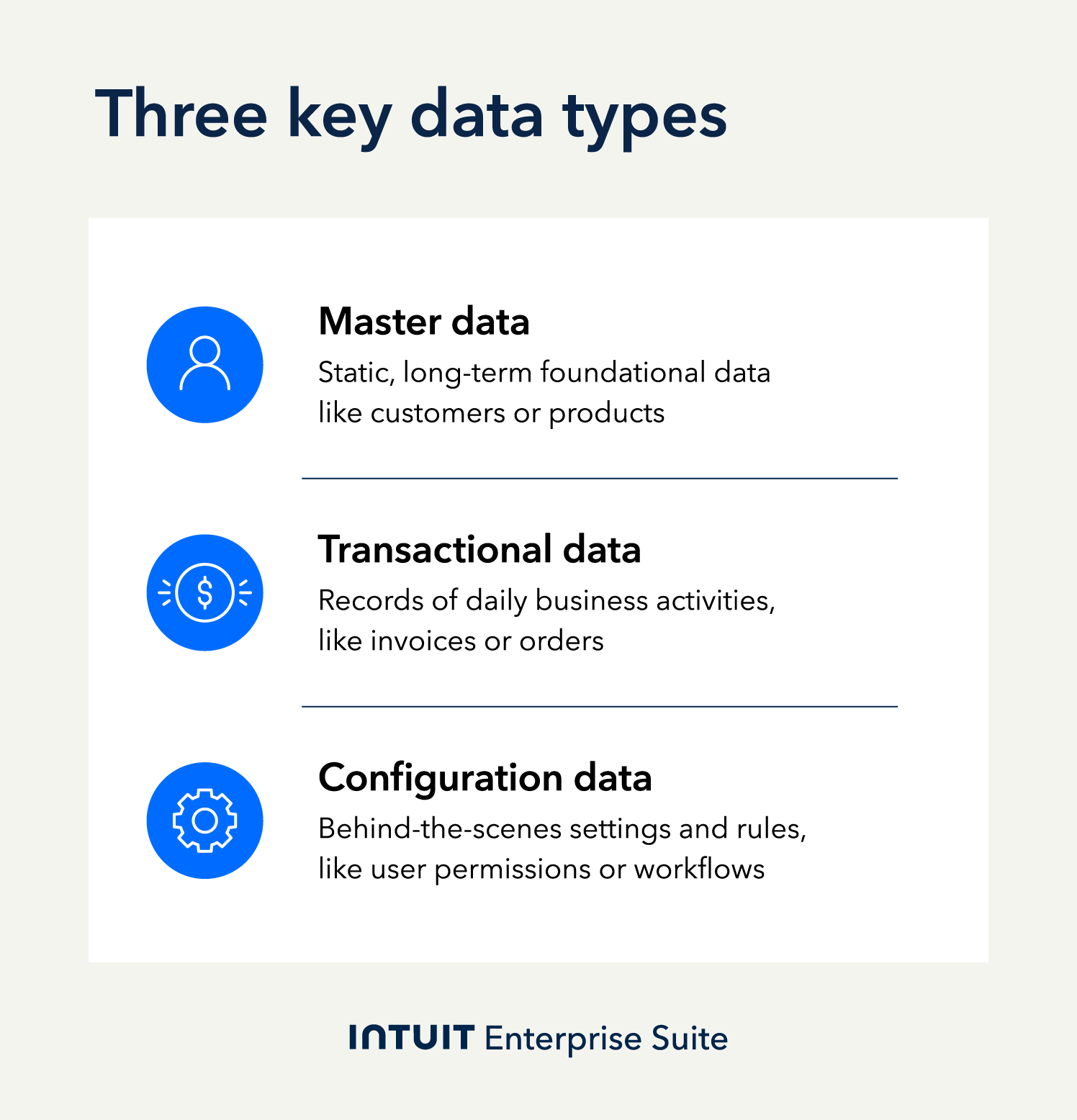
The core of an ERP system is its ability to integrate key business functions into one platform. To do this, ERPs use three distinct data types: master, transactional, and configuration.
Master data
Often static or unchanging, master data is the long-term information you need to run your business. For instance, employee records, customer details, vendor information, product catalogs, and more. These datasets provide a foundation for all the transactions your business conducts. For example, with master data like customer IDs, an ERP system can help you track sales, shipments, and payments for each customer.
Similar to master data, organizational data provides an ERP with more details about your business structure. By defining your organizational hierarchy, an ERP can help you manage multiple locations and departments.
Transactional data
Transactional data consists of all your daily business activities. This includes documents such as purchase orders, invoices, and expense claims, as well as other actions, such as stock adjustments and shipment tracking.
This data is essential for tracking and managing many of your daily operations, from making a sale to logging employee hours. The scope of what gets captured is determined by which functions your ERP supports.
Configuration data
Behind-the-scenes configuration data tells your ERP how to operate. This can include user permissions, workflows, account structures, and any other guidelines you want your ERP to adhere to.
For instance, for financial management, configuration data might include currency settings, payment terms, a chart of accounts, tax codes, payroll user permissions, and general ledger workflows. The more customized your ERP solution, the more your system will rely on configuration data.

When you schedule a demo, you agree to permit Intuit to use the information provided to contact you about Intuit Enterprise Suite and other related Intuit products and services. Your information will be processed as described in our Global Privacy Statement.
Navigate midsize business challenges and opportunities
As your business grows, financial complexity tends to outpace the tools built to manage it. Multi-entity structures, intercompany transactions, and consolidated reporting create demands that standard accounting software isn't designed to handle.
Understanding the full benefits of ERP software starts with recognizing when complexity has outgrown your current systems—and choosing a solution built to scale with it.
If your business is at an inflection point, consider Intuit Enterprise Suite, which helps you manage multiple entities and project-based accounting, all with tailored support.
Check out upcoming events and learn more about Intuit Enterprise Suite.

Customer stories

Case Study
How FEFA Financial is growing with Intuit Enterprise Suite—without migrating to an ERP

Case Study
How this mission-driven, employee-owned company created efficiencies with Intuit Enterprise Suite
October 25, 2024

Case Study
Why this camping business chose Intuit Enterprise Suite over NetSuite
October 25, 2024

Case Study
Migrating to Intuit Enterprise Suite took 2 hours (with zero disruption) for this aspiring $50M revenue business
April 25, 2025

Case Study
Humble House Foods case study: How they improved visibility & simplicity using Intuit Enterprise Suite
September 24, 2025
More on ERPs

Guide
Data analytics: How AI-driven ERP data analytics reveal blind spots & align resources for growth

ERP
ERP implementation: From spreadsheets to an integrated & scalable ERP system
May 27, 2025

ERP
7 advantages of an ERP system every exec & business owner should know
November 22, 2024

ERP
AI in ERP: Unifying data using intelligent automation
October 14, 2025