Table of contents
Table of contents
Inaccurate financial records can lead to last-minute adjustments, delays, and rework during the financial close process. That can lead to difficult questions from auditors and the board.
In regulated companies, factors such as intercompany funding and settlement timing further complicate the process. Nearly 60% of companies struggle with data scattered across different systems, which makes it harder to reconcile balances and produce audit-ready support across entities.
One way to overcome this is to implement an audit-ready financial statement close process. Below, find out what benefits it offers and how to build one for your firm.

What is the financial statement close process?
The financial statement close process is the set of steps finance teams follow to close the books at the end of a reporting period. The goal is to ensure the books:
- Accurately reflect your company’s financial position
- Are consolidated and ready for audits, internal review, and external reporting
In regulated closes, auditors expect a clear trail for intercompany, settlement, and other high-risk accounts.
Ideally, each reconciliation and adjustment includes the preparer, the approver, and supporting evidence. This simplifies record consolidation for audits and compliance checks, eliminating the need to manually search email threads and spreadsheets.
While companies traditionally performed financial closes at period end, some are now moving to a new system of continuous accounting.
Teams now carry out reconciliation, review, and related work throughout the month instead of right at the very end. The result is reduced late adjustments and improved compliance and audit-readiness.

Multi-dimensional accounting is a way of tagging transactions so you can report by entity, product, region, or channel without rebuilding spreadsheets.
Teams can quickly trace variances to the source, saving them from late-cycle remapping and reclassing across multiple entities.
The path to audit readiness: 3 essential requirements
Moving from manual, fragmented close steps to a governed and audit-ready process across multiple entities requires three building blocks.
Those elements are:
1. Standardized workflows across entities
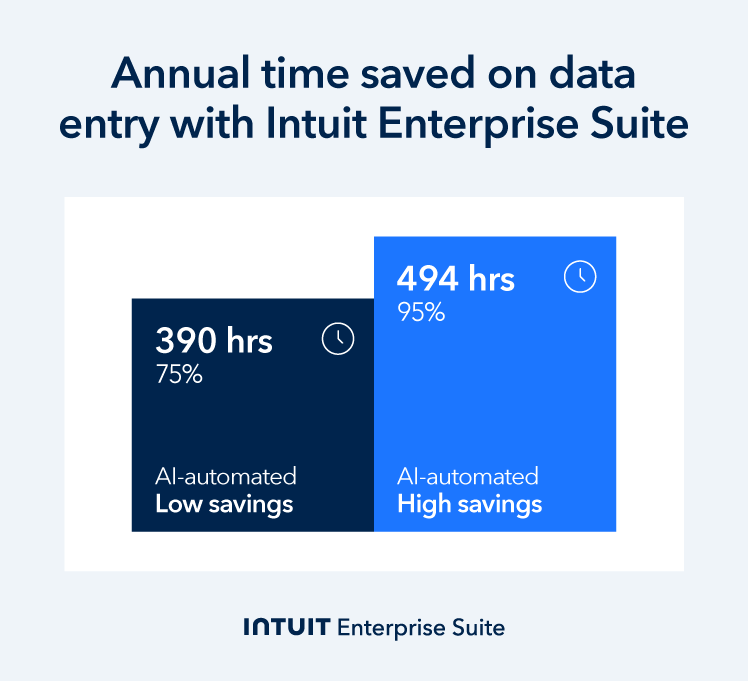
Standardized workflows and approval hierarchies in regulated, multi-entity businesses address data drift. They also reduce manual effort around close. For example, Forrester TEI study modeled 75–95% time savings (390–494 hours) on annual data entry tasks for Intuit Enterprise Suite users.
Multi-entity companies see more exceptions if each subsidiary has its own approach to evidence standards, sign-off routes, and intercompany mapping rules. They often appear late in the process as unexplained variances and late adjustments that bounce back and forth between teams resolve them.
Inconsistent intercompany mapping and settlement handling across subsidiaries can also lead to audit questions. To reduce this risk, ensure each subsidiary closes under the same rules and maintains the same audit trail.
2. Automation-assisted matching and reconciliations
Automation can handle high-volume matching, especially in clearing, settlement, and intercompany accounts. It also reduces the manual tie-outs that lead to errors and delayed sign-offs.
In the same Forrester TEI study, their modeling showed that improved workflows could save 60%-95% of the time spent on reconciliation tasks by year three.
An AI-native ERP like Intuit Enterprise Suite makes this possible by:
- Using consistent rules to match transactions at scale
- Alerting finance teams to exceptions that need review
- Storing records of what matched, what didn’t, and who provided approval
The time saved means you can spend more time on reviewing mismatches and sign-offs, and less on manual clean-up.
Cash reconciliation issues are where many close delays start, because cash, settlement, and clearing accounts carry high volume and small timing differences. Tightening these reconciliations early reduces manual tie-outs and stops small breaks from turning into last-week escalations.
3. BI-level visibility into status aging and ownership
Having business intelligence-level visibility into who owns an open item and how long it’s been waiting for review is critical for maintaining internal and external reporting deadlines.
However, 68% of CFOs said they would like technology and automation enhancements to improve their close process, which could offer them more timely and accurate insights. A proactive, AI-powered approach to financial close means fewer last-minute adjustments and sign-off surprises because your team resolves issues when they’re still small.
Benefits of a standardized, automated close
A standardized, automated close reduces the risk of misstatements and audit delays by consistently recording reconciliations, approvals, and supporting evidence.
Standardization and automation bring a range of benefits, including:
Reduced operations costs
Keaton Trager, CFO of FEFA Financial LLC, estimates the company spends 10+ fewer hours per month on financial close thanks to AI-native ERP, Intuit Enterprise Suite. That’s because automation-assisted matching takes on the bulk of high-volume transaction matching that would otherwise tie up their team.
Automation also changes how you use senior time, empowering you to prioritize responsibilities, like validating intercompany eliminations.
Improved report accuracy
Manual, spreadsheet-driven workflows make it harder to prevent and catch mistakes.
When team members don't have the resources to support their workload as the company scales, errors like broken formulas, copy-paste mistakes, hidden rows, and version control issues increase. In fact, a Gartner report found that 18% of accountants make financial errors every day, and 59% make several errors per month.
A system of record reduces these risks by keeping the numbers and approvals in one place. It pulls balances from the general ledger, ties each reconciliation back to those balances, and keeps an audit trail for all changes and sign-offs.
For higher-risk accounts, agree on what “good support” means for them so reviewers don’t send them back for rework at review time.
This approach ensures data integrity and reduces the risk of material misstatements, so you spend less leadership time firefighting and more time on decision-making and strategic planning.

Compressed financial close cycles
In Grant Thornton’s CFO survey, 76% of respondents said they close within 15 days, with 43% stating they want to close faster. Traditional ‘linear’ close work, where teams must finish one task before starting the next, creates delays and bottlenecks.
Modern close work has multiple parallel work streams, driven by automation. Teams are more productive with volume work and have more visibility into assigned responsibilities for exceptions across the entity. Give each high-volume account an owner and cutoff points for weekly aging to clear the backlog throughout the period rather than at deadline time.
You can see on business performance dashboards which jobs are open and what needs attention right now.
Teams move from a 15-day close cycle to a continuous close state where books are kept close to final throughout the period. This provides you with timely and reliable financial data to base recommendations and decisions on.
Use your cash management solution to keep a reliable view of cash and liquidity while the close is still in motion. When cash and clearing balances are up to date, older unreconciled items stand out earlier, which makes it easier to assign ownership and clear them before sign-off.
Investor & auditor confidence
Audit lags have consequences. A report by the Journal of Capital Markets Studies suggests that a lag in audit reporting leads to a higher cost of equity capital.
The centralized digital paper trail generated by automation allows auditors to self-serve without the constant need to request Prepared by Client (PBC) records. Have your team attach evidence as they go, not after the close, so you spend less time preparing PBC packs.
This builds institutional confidence because stakeholders, board members, and potential investors see a finance function with consistent controls and a clear audit trail.

How to modernize your financial close process
Follow this practical roadmap to replace fragmented, manual close work with a governed, repeatable process based on continuous accounting.
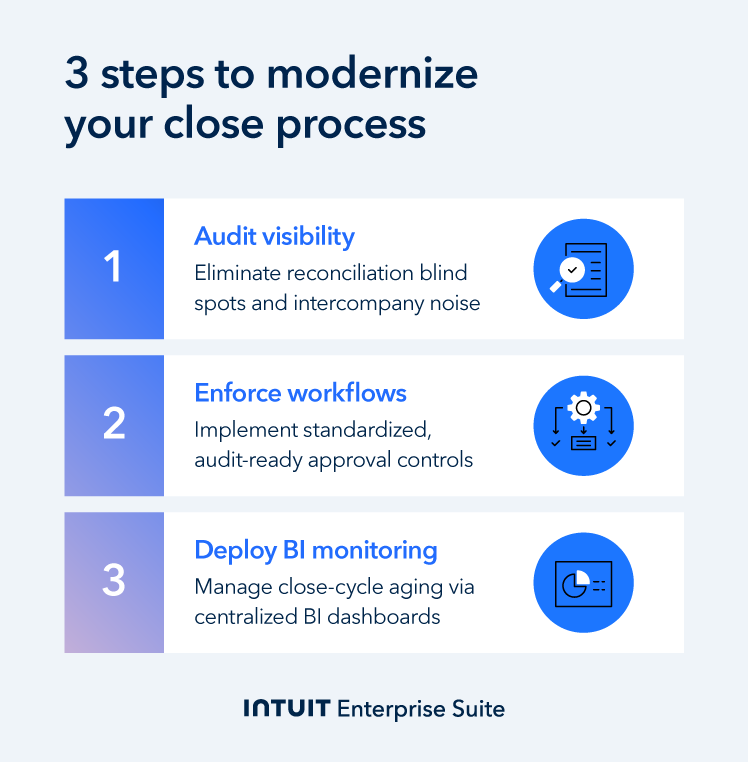
Step 1: Audit your current "reconciled" vs. "unreconciled" visibility
Small discrepancies often turn into late adjustments because teams don't spot them early enough. Start by identifying reconciliation blind spots. Often, they're intercompany eliminations or high-volume clearing accounts.
Measure how long it takes finance to notice that a specific account is out of balance. This helps you see where delays in the close process originate from.
Intuit Enterprise Suite provides you with a consolidated, multi-entity view. Start with the group view, then drill into the entity and transaction that is the cause of the variance.
Use this functionality to spot variances before they escalate, resolve issues faster, and have confidence in the numbers before close.
Example: Three manufacturing entities use the same shared clearing account. If the clearing account still carries a balance, it usually means an entry is missing, duplicated, or misplaced.
With manual visibility, the Controller often only spots this late in the close. Consolidated reporting flags the exception earlier, shows which entity it relates to, and allows the team to correct it before sign-off.
Cloud ERP is a single system that keeps finance data, workflows, and reporting in one place. Like with Intuit Enterprise Suite, one of the benefits of ERP software includes tighter controls at close: a single approval trail across entities, and fewer late mismatches.
Step 2: Implement standardized approval workflows
Email-based approvals slow the close when teams struggle to see who approved what and when. Move approvals out of email threads into a system of record so each has an owner and a timestamp.
Set these clear rules:
- Every reconciliation must have a preparer and a reviewer
- Each approval needs a digital timestamp (SOX-lite compliance)
- The same rules apply across all entities
Intuit Enterprise Suite lets you control who can post, edit, and approve at key points in the close across all group companies. You get audit-ready documentation by default, eliminating the need to reconstruct approval trails when auditors or board members question controls.
Example: A hospitality group has five properties, each of which is its own entity. Before, approvals were handled over email, so evidence and sign-off varied by property and had to be chased at close.
Now, each property finance lead prepares reconciliations and approvals as part of the shared group workflow. The software records and stores each approval with a timestamp, and the audit trail is identical across all five entities.
Step 3: Layer in BI reporting to monitor status aging across the organization
Control over the close improves when you can see what is open, who owns it, and how long it has been open. Set up checklists to track what’s been completed and what’s still open. Your dashboard will show which items need to progress and who owns them.
Use BI tools to track how old unreconciled items are by task owner and account. Set a 30-day threshold so anything older automatically alerts a senior team member for review. This early-warning approach ensures that what are currently small discrepancies don't turn into later audit findings.
In particular, firms in more regulated sectors need to clarify ownership, review status, and provide evidence across entities.
You can use Intuit Enterprise Suite’s consolidated dashboards and KPIs to monitor open items, aging, and ownership across the group without pulling separate entity reports.
Example: A multi-entity trade contractor uses consolidated dashboards to monitor labor cost aging and unbilled materials across several large-scale projects. When field data (like labor hours) remains unreconciled beyond the weekly close window, the suite alerts the Controller. This visibility allows the firm to link costs directly to project margins in real time.

When you schedule a demo, you agree to permit Intuit to use the information provided to contact you about Intuit Enterprise Suite and other related Intuit products and services. Your information will be processed as described in our Global Privacy Statement.
Boost productivity and enhance profitability
Continuous accounting workflows reduce late adjustments each reporting period. The result is a cleaner sign-off and financials you can present to the board, investors, and auditors.
As Intuit’s AI-native ERP, Intuit Enterprise Suite unifies multi-entity close, reconciliations, eliminations, and audit controls in a single system of record. In a commissioned Forrester TEI study, Intuit Enterprise Suite delivers a 299% ROI for companies, reflecting time savings and efficiency gains across finance operations.
Schedule a call to find out more about how Intuit Enterprise Suite assists firms through the financial close process.
Check out upcoming events and learn more about Intuit Enterprise Suite.
Customer stories

Case study
How FEFA Financial scaled up with Intuit Enterprise Suite (No ERP migration needed)

Case study
Case study: Fire & Ice transforms multi-entity challenges with Intuit Enterprise
October 25, 2024

Case study
Four Points RV Resorts review: Why they chose Intuit Enterprise Suite over NetSuite
October 25, 2024

Construction
Migrating to Intuit Enterprise Suite took 2 hours (with zero disruption) for this aspiring $50M revenue business
April 25, 2025

Case study
Humble House Foods case study: How they improved visibility & simplicity using Intuit Enterprise Suite
September 24, 2025
More product updates

Product update
What’s new in Intuit Enterprise Suite spring 2025
April 1, 2025

Product update
Intuit Enterprise Suite 2025 update: AI agents & automation enhancements
July 22, 2025

Product update
What’s new in Intuit Enterprise Suite November 2025: The AI-native ERP that adapts with your business
November 14, 2025