Table of contents
Table of contents
What is ERP integration? ERP integration connects an Enterprise Resource Planning (ERP) system with other business applications to enable seamless data flow and communication.
Implementing a traditional ERP system remains a significant milestone in a business’s growth, yet Gartner research indicates that up to 70% of these implementations fall short of their intended goals. The most common culprit is not a lack of features, but a failure of interoperability, where the core financial system cannot effectively communicate with the existing application ecosystem.
When a financial core operates in isolation, it creates a data vacuum—so instead of the streamlined visibility you invested in, your finance team is left managing manual reconciliations to bridge the gap between systems.
In this article, we'll examine various ERP integration methods, provide strategies to maintain data integrity, and explore high-leverage alternatives for firms seeking enterprise-grade control without the implementation burden and complexity typical of traditional ERP systems.

What does ERP mean?
An ERP is a centralized software platform that manages and automates core business processes, such as supply chain, human resources, project accounting, and manufacturing.
Traditional systems often struggle to maintain pace with specialized third-party tools, but a modern, integrated ERP functions as a single source of truth. This connectivity eliminates the friction of disconnected data silos, establishing a single, authoritative source of truth for both financial and operational metrics.
When every department leverages the same real-time data, reporting cycles accelerate, audit readiness improves, and leadership can execute high-stakes decisions with heightened fiscal confidence.
 According to Forbes, 95% of businesses report improvement in their processes after implementing an ERP system. Transitioning from manual, reactive accounting to an automated, audit-ready framework is key for scalable growth.
How ERP integration works
An ERP system works by integrating multiple business processes into a centralized hub. As a result, your business's information and data from all entities are visible from a single dashboard with real-time updates.
ERP solutions use APIs, middleware, and data mapping to synchronize your existing applications. For those using a hybrid or cloud ERP, the system will also use cloud-based tools to enable remote access and automated updates.
For finance leaders, this eliminates the information lag that typically plagues multi-entity structures, providing a real-time, consolidated view of liquidity and obligations.
5 ERP integration methods
Selecting the optimal integration framework is a strategic decision that dictates the long-term scalability of your business’s financial infrastructure. For the CFO, the objective is to move beyond simple data syncing toward a robust, high-fidelity synchronization.
The following sections break down both the integration methods used to connect systems and the deployment environments that host them, enabling you to align IT investments with specific security and operational goals.
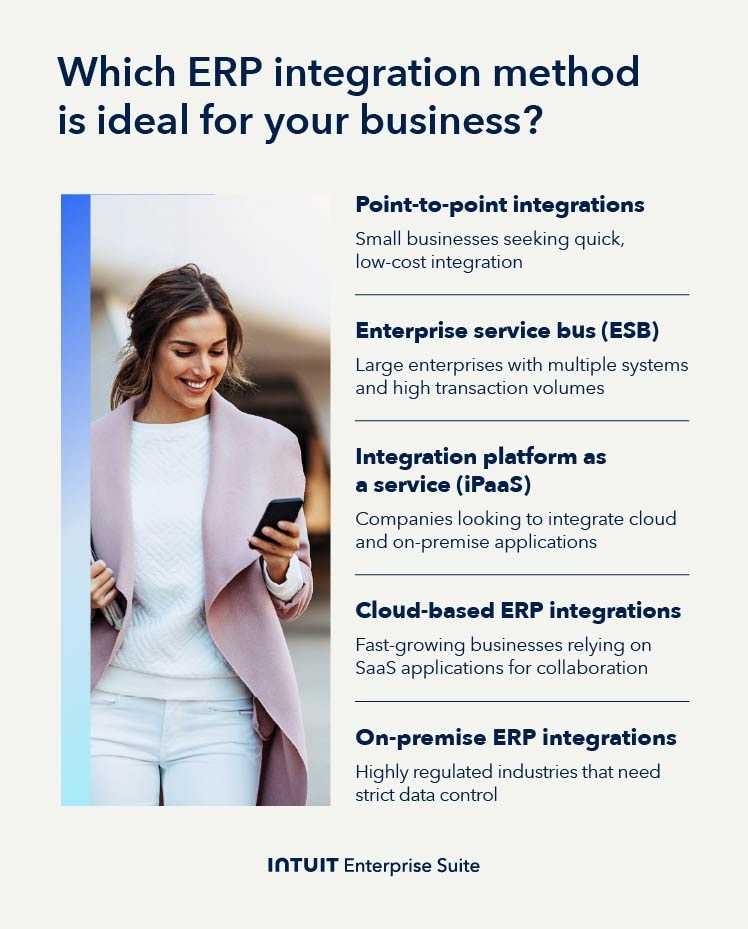
1. Point-to-point integrations
Point-to-point integration involves creating direct connections between your ERP system and individual applications. For example, you link your ERP directly to a CRM system or an e-commerce platform to enable seamless data flow.
While this approach is relatively simple and cost-effective for small-scale operations with limited applications, it is difficult to scale. As connections grow, the architecture becomes increasingly complex and expensive to maintain, often leading to technical debt.
2. Enterprise service bus (ESB)
An ESB acts as a central hub that manages and standardizes the communication between different applications and your ERP system. Instead of connecting each system individually, like in point-to-point integration, ESB reduces the need for direct connections.
Unlike iPaaS (Integration Platform as a Service), which is a cloud-native solution optimized for rapid SaaS connectivity, an ESB is typically an on-premise architectural choice designed for high-security legacy environments.
This method is highly scalable and flexible, making it ideal for larger companies with multiple systems. To ensure operational continuity, you can add or modify applications without disrupting the entire system.
Enterprise use case:
A large distributor is growing rapidly through acquisition, resulting in disparate systems across multiple newly formed entities. The firm requires an ERP solution that can consolidate financial data in real time while connecting to:
- Their existing Tier 1 CRM system
- A legacy ERP system used by the original, largest subsidiary
- The unique general ledgers from the acquired entities
3. Integration platform as a service (iPaaS)
iPaaS is a cloud-native, third-party middleware solution that simplifies the process of connecting your ERP system with other applications.
Unlike traditional on-premises solutions, iPaaS enables integration between cloud and on-premises systems via pre-built connectors. It’s a highly flexible option, ideal for businesses that are transitioning to or already leveraging cloud-based applications.
This approach provides the scalability required for rapid growth without the need for complex custom coding. Most platforms also include monitoring and security features to reduce the burden on your IT team.
Enterprise use case:
A multi-entity manufacturer needs a modern cloud solution for consolidated financial reporting and payroll, while retaining specialized, on-premises systems such as Material Requirements Planning (MRP) and WMS.
Using an Integration Platform as a Service (iPaaS), the firm connects the cloud ERP's finance modules to these operational legacy tools. This strategy centralizes finance data—achieving faster closes and improved working capital control—without replacing critical, specialized systems.
4. Cloud-based ERP integrations
Cloud ERP integrations connect your ERP system with other cloud applications, enabling your teams to fully leverage the flexibility and scalability of cloud technology. These integrations allow real-time data sharing between systems hosted in the cloud, enabling faster communication and better accessibility across departments.
Since cloud-based solutions eliminate the need for on-premises hardware, they significantly reduce infrastructure costs while offering more agility to adapt to business changes.
This method is particularly advantageous for businesses that use multiple SaaS platforms, as it supports seamless, automatic updates and reduces downtime. Ensure that your business has strong data security measures in place to protect sensitive information transmitted over the cloud, as well as stable internet connectivity for uninterrupted access.
5. On-premise ERP integrations
On-premise ERP integrations connect your ERP system to applications hosted on your internal servers, giving you complete control over your data environment.
For industries with strict regulatory requirements—such as healthcare or defense—keeping sensitive data within company-owned infrastructure ensures you maintain the highest level of security and compliance.
While on-premise integrations provide more control, they have higher maintenance costs and less flexibility compared to cloud-based options. You’ll need dedicated IT resources to manage updates, security patches, and hardware upkeep.
Additionally, scaling or adapting to new applications can be more time-consuming and expensive, making on-premise integration a less agile choice for rapidly growing businesses.
Benefits and challenges of integrating ERP
Integrating an ERP into your existing ecosystem drives organizational performance by providing the real-time visibility needed for precise resource allocation. Below are some main advantages:
- Improved efficiency and productivity: Automating manual workflows allows your finance and operations teams to focus on higher-value strategic tasks. It enables employees to focus on more strategic tasks, ultimately boosting workplace productivity.
- Enhanced data accuracy and consistency: Centralizing your data minimizes the risk of manual error and reporting discrepancies. This ensures every department operates from the same dataset, providing more reliable gross margin insights.
- Strategic decision-making: Integrated ERP systems provide real-time analytics and reporting, empowering you with the data needed to make informed decisions and strategize for future growth.
- Scalability and flexibility: As your business grows, an integrated ERP can adapt to changing operational demands, enabling seamless expansion without disruption.
- Streamlined business processes: Integration eliminates departmental silos, ensuring that workflows are synchronized. This leads to faster response times and more efficient service delivery across the business.
While the benefits are significant, there are real challenges to navigate:
To overcome these challenges, the objective is to select an integration approach that prioritizes data quality and audit readiness. By choosing a suite designed for multi-entity complexity, finance leaders can bridge the gap between legacy systems and modern scalability—ensuring that growth doesn't come at the expense of financial control.

When you schedule a demo, you agree to permit Intuit to use the information provided to contact you about Intuit Enterprise Suite and other related Intuit products and services. Your information will be processed as described in our Global Privacy Statement.
5 key integration areas for ERP implementation ROI
A successful ERP implementation is defined by the depth of synchronization between core finance and the organization's high-leverage business units. Rather than being a standalone accounting tool, an integrated ERP functions as a centralized command center for multi-entity reporting and working capital oversight.
For the $10M+ enterprise, the true return on investment for ERP solutions like Intuit Enterprise Suite is realized when data flows horizontally, eliminating the reporting latency that traditionally hampers multi-entity decision-making.
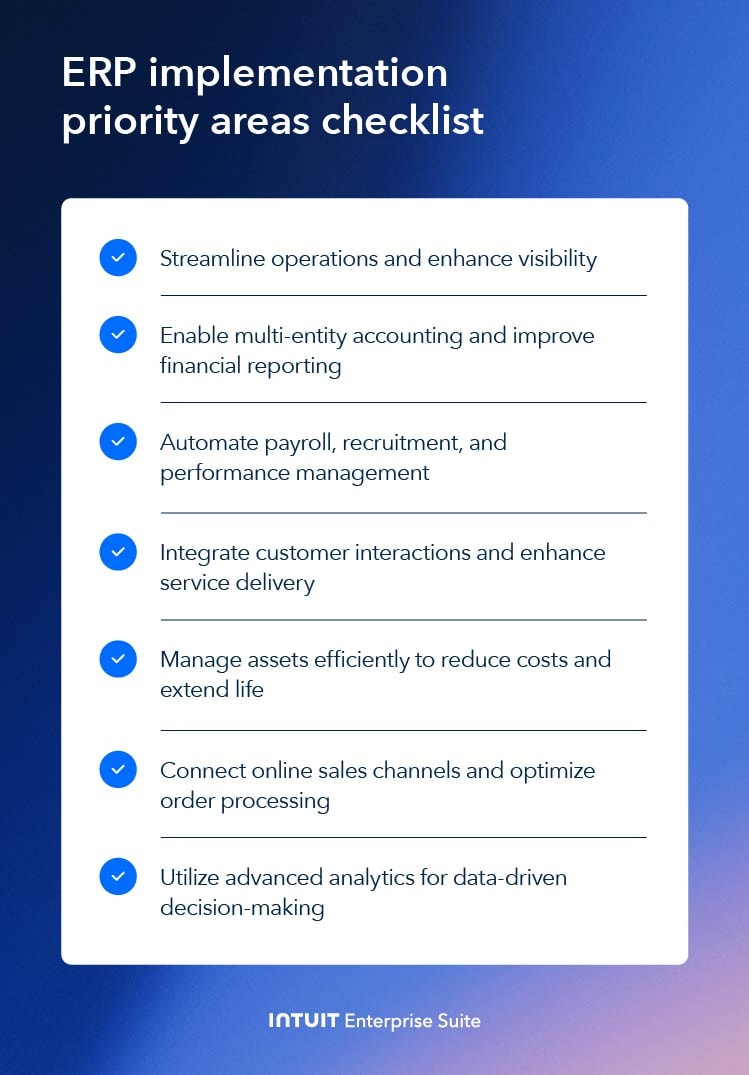
Prioritizing these five integration nodes through the integration process is the key to improving your bottom line:
- Finance and accounting: An integrated ERP solution provides accurate financial reporting and supports multi-entity accounting, facilitating better compliance and financial operations across different business units.
- Human resources: Automating HR processes such as payroll, recruitment, and performance management leads to improved employee satisfaction and operational efficiency.
- CRM: Integrating CRM data provides finance leaders with a high-fidelity view of the sales pipeline for more accurate revenue recognition and cash-flow forecasting. It enables the analysis of customer profitability, helping the firm identify which service lines or products deliver the highest margins.
- Enterprise asset management (EAM): Efficiently managing company assets through an integrated ERP system can reduce maintenance costs, extend asset life, and improve operational performance.
- Business Intelligence (BI): Embedding BI tools directly within your ERP enables advanced predictive analytics. This moves your reporting from "what happened" to "what will happen," helping you identify trends that influence long-term strategy.
<
6 best practices for integrating ERP
Successful ERP integration requires disciplined execution and workforce management. Here are the best practices you should adopt to streamline your process and maximize the benefits of your ERP investment.
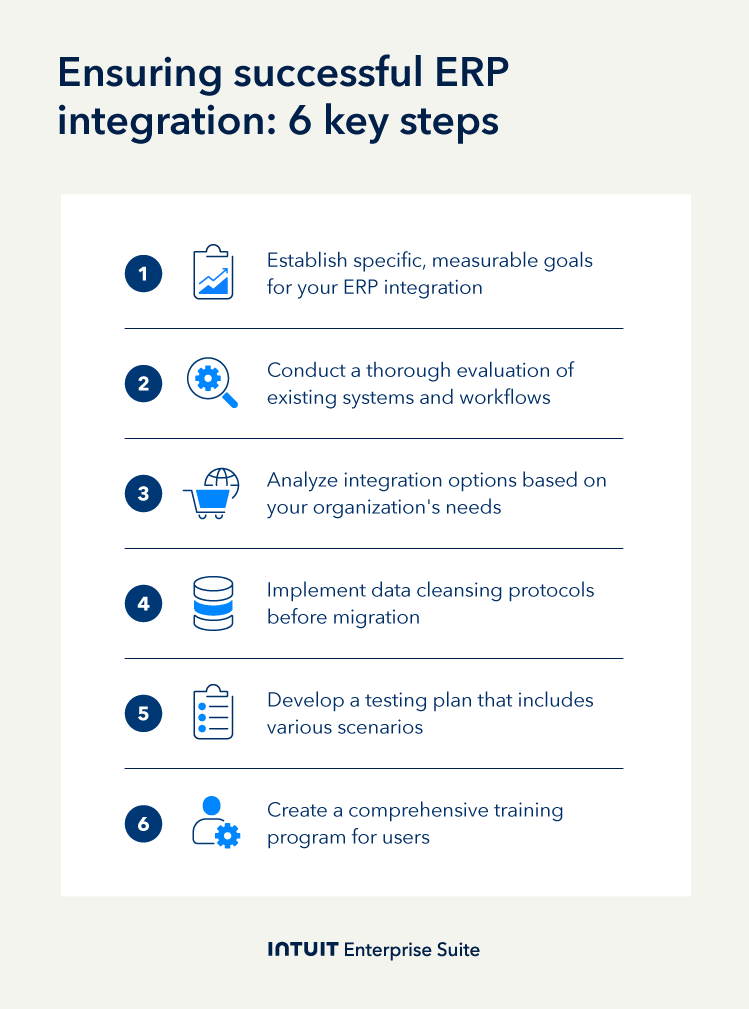
1. Define clear goals and objectives
Establish specific integration KPIs that align with the business's long-term capital strategy and operational scale. Whether the objective is compressing the multi-entity consolidated close by 30% or reducing Day Sales Outstanding (DSO) by five days, these metrics provide the strategic roadmap for the project and a robust framework for assessing ROI.
2. Assess current systems and processes
Conduct a technical audit of existing workflows to identify where manual data re-entry currently exists. Mapping these friction points is essential, as every manual touchpoint increases the risk of error and delays your consolidated reporting.
Documenting structural gaps—such as non-standardized Charts of Accounts (COA) or siloed subsidiary data—helps you decide whether to prioritize cloud-based agility or use middleware to stabilize legacy systems.
3. Choose the right integration method
Select an integration method that best suits your company’s size, complexity, and future growth plans. Consider factors such as scalability, data flow, and system compatibility when evaluating options.
For instance, FEFA Financial was looking for reporting and automation tools. Initially, they considered large ERP systems, but they were concerned about migration, costs, and the complexity of systems that were not well understood.
Instead, they chose the intuitive Intuit Enterprise Suite solution because it had all the accounting tools they needed.
4. Prioritize data quality and cleansing
After selecting the ERP system, ensure that all data migrated into it is accurate, complete, and relevant. Data cleansing helps prevent issues arising from poor-quality data. Plus, data issues are the number one reason for ERP implementation delays.
Let’s say you’re moving from an old ERP to a newer one, but you don’t want to lose access to your existing data. By taking the time to clean up the data and plan the migration, you won’t risk losing it.
5. Implement robust testing and quality assurance
Testing serves as your final risk-mitigation layer. The Controller should oversee end-to-end testing to validate that data flows accurately across all subsidiaries before going live.
This phase identifies errors in a sandbox environment, preventing the corrupted audit trails and reporting inaccuracies that can derail enterprise-scale projects. By resolving these issues early, the organization avoids the operational disruptions and manual fixes that follow a failed launch.
6. Provide adequate training and support
Finally, successful integration requires that teams across every subsidiary understand their role in maintaining the organization’s single source of truth. When systems are interconnected, a data entry error in a regional office can immediately distort your consolidated financial reporting.
Training should focus on standardized data-entry protocols and the specific touchpoints where operational inputs trigger financial outputs—such as how a project milestone update in a PM tool automates revenue recognition within the Intuit Enterprise Suite.
Four Points RV Resorts took this step seriously once they decided to integrate an ERP solution. Before making a choice, they demoed different ERPs for months, letting staff learn the ropes.
In the end, they chose Intuit Enterprise Suite because they were already familiar with the tools and they felt wholly supported. By selecting a system they were already familiar with, they bypassed the steep learning curve that often leads to data-entry friction during a transition.

Boosting productivity and profitability for growing businesses
Integrating Intuit Enterprise Suite eliminates the high costs and deployment lag associated with legacy systems. This adaptable architecture synchronizes your tech stack into a high-performance cash management solution without the overhead of custom coding.
By removing multi-entity data silos, finance leaders gain the real-time visibility necessary to protect margins and optimize working capital as the business scales.
For firms outgrowing mid-market tools, this flexible infrastructure delivers enterprise-grade control while maintaining the deployment velocity essential for modern, high-growth organizations.
Check out upcoming events and learn more about Intuit Enterprise Suite.

Customer stories

Case Study
How FEFA Financial is growing with Intuit Enterprise Suite—without migrating to an ERP

Case Study
How this mission-driven, employee-owned company created efficiencies with Intuit Enterprise Suite
October 25, 2024

Case Study
Why this camping business chose Intuit Enterprise Suite over NetSuite
October 25, 2024

Case Study
Migrating to Intuit Enterprise Suite took 2 hours (with zero disruption) for this aspiring $50M revenue business
April 25, 2025

Case Study
Humble House Foods case study: How they improved visibility & simplicity using Intuit Enterprise Suite
September 24, 2025
More on ERPs

Guide
Data analytics: How AI-driven ERP data analytics reveal blind spots & align resources for growth

ERP
ERP implementation: From spreadsheets to an integrated & scalable ERP system
May 27, 2025

ERP
7 advantages of an ERP system every exec & business owner should know
November 22, 2024

ERP
AI in ERP: Unifying data using intelligent automation
October 14, 2025