Table of contents
Table of contents
Key takeaways:
- Enterprise Resource Planning (ERP) software is invaluable for growing and enterprise-sized businesses because it easily integrates business processes into a single, unified solution.
- An AI-native ERP, like Intuit Enterprise Suite, provides enterprise-grade power with the usability, intelligence, and adaptability modern finance teams expect.
- Shifting from fragmented systems to a connected platform can unify hundreds of entities and save CFOs nearly $200k per year.
As businesses scale toward enterprise-level commerce or take on new subsidiaries, financial complexity can outpace legacy systems. Modern finance leaders are moving beyond basic accounting to AI-native ERPs that unify global entities and automate high-volume workflows.
In fact, a Forrester study projected a 299% ROI over three years for Intuit Enterprise Suite, driven by massive efficiencies in intercompany transactions and automated reporting. But what is ERP software, and what concrete outcomes can you expect?
Let’s take a look at how an adaptive, enterprise-grade ERP empowers you to move from hindsight reporting to forward-looking strategy.

What is an ERP system?
An enterprise resource planning (ERP) system is software that enables companies to manage their core processes in a single platform. Think of it as a control panel that lets you view the organization’s data across all entities and key departments, such as HR, finance, and manufacturing.
The idea is that better visibility and accurate information about your company’s overall financial health will give you the tools to make better decisions. This allows you to reallocate resources to more profitable projects or strategies and improves your ability to pivot in the face of changing markets.
For example, instead of relying on disparate software for each department and individual subsidiary reporting, a CFO can use an ERP system to view all financial data in one place and close the books faster each month.

Is Excel an ERP system? Excel is not an ERP system; it’s spreadsheet software that offers numerous features to help organize your business and track and analyze data.
It’s helpful and accessible, but lacks the comprehensive functionality and integration capabilities of an ERP system, like Intuit Enterprise Suite.
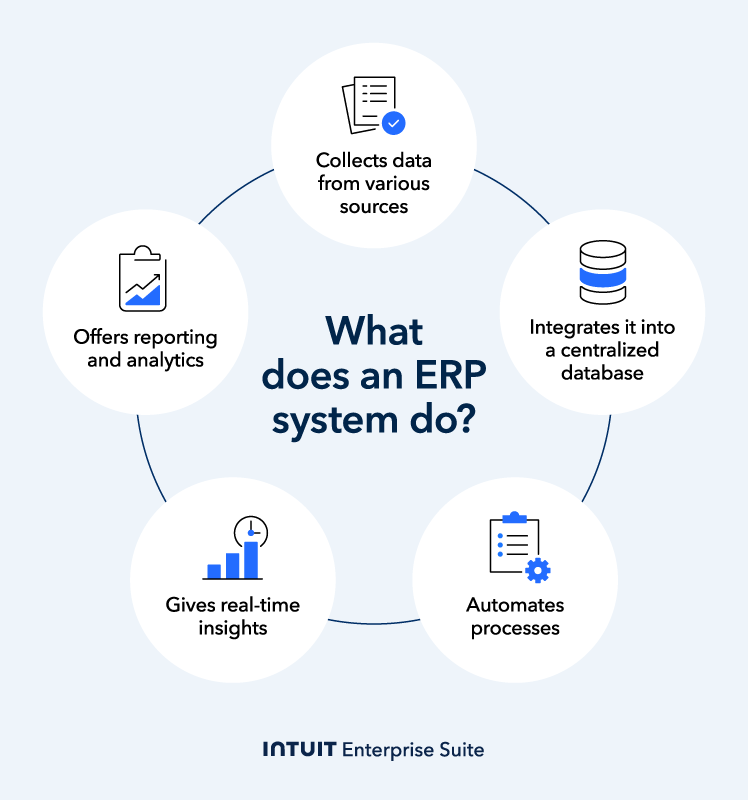
What is ERP systems’ core functionality?
Here are some of the key components of enterprise resource planning software:
- Data collection: ERP services collect data from various sources within an organization, including transactions, customer information, and employee records.
- Integration: This data is then integrated into a centralized database, creating a single source of truth.
- Process automation: ERP systems can help automate various business processes, including order processing, inventory management, accounting, HR management, and financial reporting.
- Real-time insights: ERP provides real-time access to data, enabling you to make informed decisions quickly.
- Reporting and analytics: ERP systems provide robust reporting and analytics tools that enable the identification of trends, patterns, and opportunities based on sorted data.
What is the role of ERP in mid-market growth?
ERP brings every facet of your company together, eliminating isolated tech stacks. Businesses that consolidate their app portfolios can save up to $198K, by leveraging best-in-class solutions that unify hundreds of entities and streamline complex financial operations, such as automated intercompany accounting and eliminations.
With real-time analytics and AI forecasting capabilities, ERP allows CFOs to pivot their business strategy quickly and plan for market trends before they happen. You can stop making decisions based on historic data and hindsight and start proactively strategizing around reliable forecasting.
Enterprise-grade platforms, like Intuit Enterprise Suite, are designed to scale with your organizational complexity, providing extensible functionality that eliminates the need for disruptive, costly system migrations.
As a unified data environment, the platform compresses reporting cycles, removes departmental silos, and supports sophisticated scenario modeling. This architecture provides the CFO with granular visibility into unit economics while maintaining a holistic view of enterprise-wide cash flow—all within a single, audit-ready ecosystem.

While an ERP improves data accessibility, it is also architected to prevent operational bottlenecks. Industry-leading systems keep teams agile by providing role-based access controls that support GAAP compliance and enhance audit readiness.
Teams can be set up to have access to exactly what they need, when they need it, without being fragmented from your business’s larger ecosystem.
What is the difference between cloud ERP and SaaS?
SaaS is any subscription software that is managed remotely over the internet, such as Slack, Dropbox, and Salesforce.
Cloud ERP is a specific type of SaaS that provides businesses with enterprise resource planning services using the SaaS model.
The 3 types of ERP implementation
There are three primary deployment models for ERP systems: cloud-based, on-premise, and hybrid. Each model offers distinct advantages and considerations for businesses. Let’s take a closer look at each type of ERP.

Cloud ERP
Cloud ERP services are hosted on a third-party cloud platform, such as Amazon Web Services (AWS) or Microsoft Azure. This model eliminates the need to invest in hardware and IT infrastructure, as the ERP provider manages all technical aspects of the system.
Advantages of cloud ERP include:
- Lower upfront costs: You don’t need to invest significant capital in hardware and software.
- Scalability: Cloud ERP can easily scale up or down to accommodate changes in business needs.
- Accessibility: You can easily access ERP software from anywhere in the world. All you need is an internet connection.
- Regular updates: Cloud providers typically handle software updates and maintenance.
On-premise ERP
On-premise ERP solutions are installed and operated on a company’s own servers and hardware. It gives full control over ERP systems but requires significant upfront investment and ongoing IT management.
Here are some advantages of on-premise ERP:
- Complete control: You have full ownership and control over your ERP data and systems.
- Customization: On-premise ERP can be highly customized to meet specific business requirements.
- Security: Some businesses may prefer the perceived security benefits of having their data on their own premises.
What is the most significant difference between cloud ERP and on-premise ERP?
Cloud ERP is hosted in the cloud through third-party platforms and delivered via the Internet. On-premise ERP is installed and operated through a company’s own servers and hardware.
Hybrid ERP
Hybrid ERP combines elements of cloud and on-premise ERP—certain modules or components in the cloud, others on-premises. This approach offers flexibility and can be useful in complex IT environments or for specific security requirements.
Hybrid ERP offers several advantages, such as:
- Flexibility: You can choose which components to deploy in the cloud and which to keep on-premises.
- Cost-effective: Hybrid ERP can be a cost-effective option for businesses with varying needs.
- Security: You can maintain control over sensitive data while benefiting from the scalability and accessibility of cloud-based components.
The 5 most common ERP software options
What is the best ERP system? While you’ll see a lot of options on the market, the best choice will depend on your company’s specific needs.
Overall, these are the five most common ERP systems:
1. Intuit Enterprise Suite
Intuit Enterprise Suite is an affordable, flexible alternative to traditional systems. This AI-native ERP gives you the power of a legacy ERP without the implementation pain—95% of Intuit Enterprise Suite customers get set up in under 30 days.

It’s ideal for service-based industries like construction and other professional services that need an integrated, scalable solution.
The Intuit Enterprise Suite platform provides industry-specific customizations, multi-entity management, and multidimensional reporting. It integrates tools for:
- Financial management
- Payroll
- Human resources
- Marketing
- Cash flow management
2. SAP
SAP is a global leader in enterprise application software. Large corporations widely utilize this company across various industries due to its comprehensive, robust, and highly integrated solutions. With over 50 years of industry experience, the company operates 109 development locations nationwide.
SAP’s features include modules for:
- Finance
- Supply chain management
- Sales
- Human resources
- Customer relationship management
The company’s software provides real-time data access, advanced analytics, and forecasting tools. Due to its ability to offer deep customization and extensive functionality, SAP is well-suited for large enterprises and multinational corporations.
Implementation is often unwieldy, taking a minimum of 12 weeks, and requires heavy IT involvement.
3. Oracle
Oracle is also a major player in the ERP industry with a strong focus on cloud-based solutions. The company’s Oracle Fusion Cloud ERP provides a modern, AI-powered platform that automates manual processes. Unlike SAP, Oracle Fusion Cloud ERP is built for both mid-sized and larger companies that want a cloud-first platform.
Oracle Fusion Cloud ERP includes built-in AI, machine learning, and analytics for real-time insights. The software offers modules for:
- Financial management
- Project management
- Procurement
- Risk management
- Enterprise performance management (EPM)
The platform, despite its benefits, has high implementation and licensing costs with complexity that creates a steep learning curve for users.
4. Microsoft Dynamics
Microsoft Dynamics is a suite of business applications that provides both ERP and CRM solutions. It easily integrates with other Microsoft products, like Microsoft 365 and the Power Platform. This ERP solution is ideal for small, medium, or large businesses that are already integrated into the Microsoft ecosystem.
Microsoft Dynamics uses AI and a low-code/no-code environment to simplify data management and automation. It offers modules for:
- Finance
- Supply chain management
- Commerce
- Human resources
Requiring a high level of customization, the platform has limited out-of-the-box reporting. Setup can be complex and necessitate intensive training and ongoing maintenance.
5. NetSuite
NetSuite is a leader in cloud-based business management software, offering a unified platform that integrates various business functions. This software is best for fast-growing organizations of any size that want to run their entire business from a single cloud platform.
Due to its native integration capabilities, which eliminate the need for third-party integrations, NetSuite can help with:
- Financial management
- Inventory
- Order management
- Supply chain management
As with the other established legacy players on this list, NetSuite is a powerful, trusted solution. However, implementation can be difficult and time-consuming—often requiring significant time, budget, and even external consultants to execute.
A modern alternative like Intuit Enterprise Suite differs by anticipating onboarding friction. It offers built-in ERP consultation to help you decide if the solution is right for your business and support your organization through implementation.
What is the total economic impact of an AI-first ERP solution?
With reduced month-end responsibilities, simplified tech stacks, time savings, and minimal disruption during migration, the benefits of ERP systems offer multiple avenues to improve business operations and increase your margins.

Intercompany transactions
Using ERP software to automate transactions between companies and their subsidiaries can result in nearly $140k in efficiency savings—not to mention the almost $100K more previously tied up in invoicing labor and payroll. ERP platforms like Intuit Enterprise Suite have been shown to reduce month-end operations from week-long marathons down to mere minutes.
When every entry is tracked, transparent, and standardized, businesses not only save time on intercompany reporting, but they can also reduce the risk of audit findings and time spent on reconciliations.
 Keaton Trager, chief financial officer for FEFA Financial, reports that his accounting staff saves two hours a week while using Intuit Enterprise Suite, and that he himself saves over 10 hours a month in financial close responsibilities.
Technology consolidation
Tech consolidation through modernized ERP systems can democratize data to improve reporting, communication, and, as mentioned previously, funnel hundreds of thousands of dollars back toward your bottom line. It’s no surprise, then, that companies are willing to shell out a little extra now to see even bigger savings down the line.
Sixty percent of companies planned to increase their technology budgets in 2025, with AI capabilities among their top considerations in platform selection.
Having a single source of truth with reliable AI-powered forecasting eliminates system sprawl that so often entangles growing firms. With native workforce, payments, and marketing solutions that work together (instead of separate tech stacks), teams enjoy a more unified, automated workflow with more time available for strategic planning and less devoted to manual data entry.
While tech stacks are shrinking, as of 2024, mid-market companies still had over 300 SaaS apps in their portfolios. Consolidate your tech stack further and faster with Intuit Enterprise Suite. Two-hour migration. Zero disruption.
Streamlined vendor management
Approving a contract with a new supplier takes an average of 3.4 weeks. However, ERP systems with automated contract lifecycle management (CLM) can reduce this by up to 82%—from nearly a month to just over 4 days.
Using a single platform to streamline vendor management reduces overhead associated with juggling multiple service-level agreements (SLAs), security checks, and renewal cycles.
With a single platform handling the heavy lifting of vendor management and customer relations, you can dedicate one customer success team as the sole point of contact for your entire financial ecosystem. Having a small group of familiar faces builds trust with vendors and clients and improves the accuracy and consistency of every communication.
B2B buyers spend an average of 16 interactions per winning vendor. Automation with proper human oversight can yield significant time savings without sacrificing the quality and value at each touchpoint.
The AI dividends
In tasks like data analysis and computation, AI agents delivered results 88.3% faster than humans, with significant time-saving implications for accounting, project management, and other tasks.
Ninety-eight percent of accountants surveyed by Intuit QuickBooks have used AI to help clients, with data entry and fraud detection being the most common use cases.
Intuit Enterprise Suite supports a rolling close approach, with automated matching and reconciliation workflows that keep financial data current and reduce manual month-end effort. This helps teams stay prepared for audit and reporting requirements without relying on spreadsheets.
With minimal intervention, your team can trust AI to increase efficiency, improve accuracy, and ensure compliance every minute of the day.
AI allows companies to shift 8.5% of staff time to higher-value or strategic tasks while maintaining human-level quality in automated tasks and improving efficiency by 69%.
Time-to-value
The greatest value comes at the intersection of high-level capabilities and low integration times. Though it varies by business size and setup, ERP integration averages 3-18 months, with outliers like Wezom openly reporting a 24-month process for larger companies.
Minimizing implementation times is key to avoiding disruptions to your company’s operations, which can often stall under legacy ERP systems. Intuit Enterprise Suite is designed with operational continuity and flexibility in mind, to minimize disruption, support scalability, and offer easy upgrade options for businesses already using QuickBooks products.
Intuit Enterprise Suite leads the industry in implementation time. Users like HFMM Legacy Group report data migration times as low as two hours.
How much does it cost to implement an ERP?
The total cost of ownership (TCO) for ERP implementations encompasses more aspects than you might know. This includes both visible expenses and those often overlooked.

Visible costs
Other than the software licensing fees, i.e., the initial cost of purchasing the ERP software, visible costs include:
- The cost of acquiring or upgrading hardware and IT infrastructure to support the ERP system
- Fees for consultants, project managers, and other professionals involved in the implementation process
- Training cost to educate your employees on how to use the ERP system to make the most out of it
- The cost of customizing the ERP solution to meet specific business needs
Unexpected costs
Unexpected or underestimated costs are less evident than visible costs and can significantly contribute to the overall cost of ERP implementation. It includes:
- The cost of migrating existing data into the new ERP system
- The cost of modifying or redesigning business processes to align with the ERP system
- The potential loss of productivity during the implementation process, and as employees adjust to the new system
- The cost of maintaining the ERP system, including software updates, technical support, and security patches
Another thing that can help is understanding the factors that affect TCO:
- ERP system complexity: More complex ERP systems generally have higher costs.
- Business size and industry: The size and industry of your business can influence the total cost of ERP implementation.
- Customization requirements: The level of customization you need can significantly increase costs.
- Implementation methodology: The chosen implementation methodology (e.g., Big Bang, phased, etc.) can impact costs.
Carefully considering all costs can help you make informed ERP investment decisions and allocate resources accordingly.

When you schedule a demo, you agree to permit Intuit to use the information provided to contact you about Intuit Enterprise Suite and other related Intuit products and services. Your information will be processed as described in our Global Privacy Statement.
Is your financial team ready for an ERP?
Operational inefficiencies often blend into everyday workflows, which can make it difficult for finance teams to identify and act on the sources of their bottlenecks.
But CFOs who were weighed down in endless close cycles and making decisions based on hunches rather than unified data are choosing change. Using best-in-class ERPs allows more time for strategy and provides a holistic view of the company to improve its bottom line.
If your company is experiencing any of these signs, it’s time to switch to an ERP system:
- Excessive manual data consolidation: Your financial team is spending more time manually surfacing data and searching through old archives than on actual performance analysis.
- Marathon month-end cycles: Instead of being performed in the final days of the month, managing intercompany transactions consumes weeks of your financial team’s time.
- Undefined permissions and low audit preparedness: Data should be transparent, accessible, and ready for review by regulatory bodies, but it should not weigh down unrelated teams. Vague permissions, data mires, and slow response times to audits signify a need for change.
- Delayed cash flow insights: Rather than pivoting your financial and business strategies in real time and planning for future projections, you’re basing your decision-making on cash flow data that is days, weeks, or even months old.
- Fragmented entity and subsidiary reporting: One or more parts of your company are siloed in finance or reporting, creating dangerous operational blind spots across regions and impeding holistic company oversight.
If you’re losing productivity to manual reporting, fragmented systems, and unusable data, Intuit Enterprise Suite’s multi-dimensional reporting and AI-powered business intelligence could push the needle for your organization.

Common challenges in ERP implementation (and how to overcome them)
You may face several challenges while implementing an ERP service, especially if it’s your first time. For instance, some platforms can have costly onboarding services, training, and ongoing maintenance.
Other implementation challenges include:
Employee training
When your business invests in robust software like ERP systems, employees must receive adequate training to ensure the organization maximizes its features and benefits.
One example of a failed ERP training process comes from Hershey in 1999. With Y2K approaching, Hershey sought to avoid the perceived issues and accelerated the implementation timeline—reducing it from 48 to 30 months.
The sped-up timeline caught employees unprepared and coincided with Halloween, one of the company’s busiest times of year. Hershey couldn’t fulfill $100 million in orders, resulting in a 19% decrease in profit and a 12% decline in sales.
Takeaway: Never rush employee training or implement a new system during a crucial business period. A slow, thorough transition protects your bottom line.
Investing the proper time in employee training can also reduce churn, with 94% of employees stating that they would remain at a company longer if it prioritized their development and learning.
Data conversion and migration challenges
Any significant software change presents challenges, and that’s certainly the case when migrating data from legacy systems to ERPs. This transition requires careful planning and execution.
In 2006, LeasePlan, a leader in the global leasing industry, began using an ERP solution alongside its existing legacy systems. Ten years later, they attempted to move to ERP only.
The problem was that leadership wanted to integrate 35 systems into one single platform in a rushed timeframe. Eventually, after $119 million in costs, LeasePlan had to abandon the entire project.
Takeaway: Avoid attempting to migrate too many complex systems at once, and ensure your timeline is realistic to prevent project failure.
Modernizing your ERP solution presents challenges, but planning ahead and ensuring employees receive proper training can help ease the transition.
Resistance to change
It’s natural for employees to resist change, especially regarding major tasks that affect their workflow. This is a common potential problem when it comes to a successful ERP adoption.
This was the case with Nestlé in the late 1990s, when it spent $210 million to integrate 29 different business units into a unified ERP solution. One of the company’s major issues during the transition was resistance to change from its workforce.
Confusion and frustration built when employees were asked to use the new system without adequate preparation or training.
Takeaway: Address employee concerns proactively and provide robust communication and training to earn team buy-in.
Dedicated IT resources
Any type of ERP implementation will require major IT resources for configuration, customization, and ongoing support. Even though ERP solutions can make processes more efficient, they can’t fix underlying process or policy issues that affect efficiency.
Nike is an example of a company that failed to maximize IT resources during its ERP implementation in 2000. The project was a $400 million failure, partly due to poor communication and coordination between the separate business units and the IT team.
The company also apparently didn’t realize how complex it would be to integrate the new ERP software into Nike’s existing systems.
Takeaway: Successful ERP implementation requires unifying your IT and business units and gaining an accurate understanding of the integration’s complexity before beginning the project.
Boost productivity and enhance profitability
Modern finance leaders are moving beyond the limitations of legacy systems that prioritize process over performance. Intuit Enterprise Suite delivers the enterprise-grade power your business demands without the complexity, high costs, or implementation friction of a traditional ERP.
It’s time for your business to upgrade its outdated legacy system. Learn how Intuit Enterprise Suite can help you leverage real-time data and visibility to make faster decisions.
Check out upcoming events and learn more about Intuit Enterprise Suite.

Customer stories

Case Study
How FEFA Financial is growing with Intuit Enterprise Suite—without migrating to an ERP

Case Study
How this mission-driven, employee-owned company created efficiencies with Intuit Enterprise Suite
October 25, 2024

Case Study
Why this camping business chose Intuit Enterprise Suite over NetSuite
October 25, 2024

Case Study
Migrating to Intuit Enterprise Suite took 2 hours (with zero disruption) for this aspiring $50M revenue business
April 25, 2025

Case Study
Humble House Foods case study: How they improved visibility & simplicity using Intuit Enterprise Suite
September 24, 2025
More on ERPs

Guide
Data analytics: How AI-driven ERP data analytics reveal blind spots & align resources for growth

ERP
ERP implementation: From spreadsheets to an integrated & scalable ERP system
May 27, 2025

ERP
7 advantages of an ERP system every exec & business owner should know
November 22, 2024

ERP
AI in ERP: Unifying data using intelligent automation
October 14, 2025