Work the way you want
From time tracking to payroll to reports, data flows seamlessly across over 850 apps.

Consolidating reports in Intuit Enterprise Suite made it easier for Jason Corby to grow his business, HFMM Legacy Group, by keeping things organized and efficient.
From time tracking to payroll to reports, data flows seamlessly across over 850 apps.
Intuit Enterprise Suite gives you greater visibility across projects and operations with Intuit AI, powerful automation, and easier collaboration.

Intuit Enterprise Suite helps engineering, management, legal, IT, and accounting firms streamline operations and strengthen profitability with Intuit AI—tailoring reports, tracking KPIs, and optimizing integrations.

Comprehensive tools help you plan, monitor, and execute projects efficiently while maintaining compliance with local, national, and industry-specific regulations and standards. Project documents, drawings, and revisions are secured, organized, and accessible.

Boost your operational efficiency by streamlining processes and systems to enhance productivity, reduce costs, and optimize resources. Integrate with other key business apps to automate workflows and connect your systems.

Manage client information, track interactions, and streamline client communication. Plus, with seamless integration, you can manage case files, documents, and deadlines efficiently, ensuring everything is accessible in a centralized system.

Connected data for better decisions
“Intuit Enterprise Suite gives me peace of mind. It gives me the data I need to make the right decisions with my team, so we can shape strategy and keep growing.”
Josh Daneshforooz, Co-Founder & CEO at Lango
Monday - Friday 5 AM PT to 6 PM PT
Intuit Enterprise Suite gives you the power of a traditional ERP plus a more intuitive interface, a simpler onboarding process, and dedicated support—so you get exactly what your business needs without anything unnecessary. To learn more about how Intuit Enterprise Suite stacks up against traditional ERPs, click here.
If you’re upgrading from QuickBooks Online, your business can benefit from the enhanced functionality of Intuit Enterprise Suite—including multi-entity management, dimensional reporting, project dashboards, and more. Manage accounting, payroll, time tracking, multiple companies, and individual projects from one central platform.
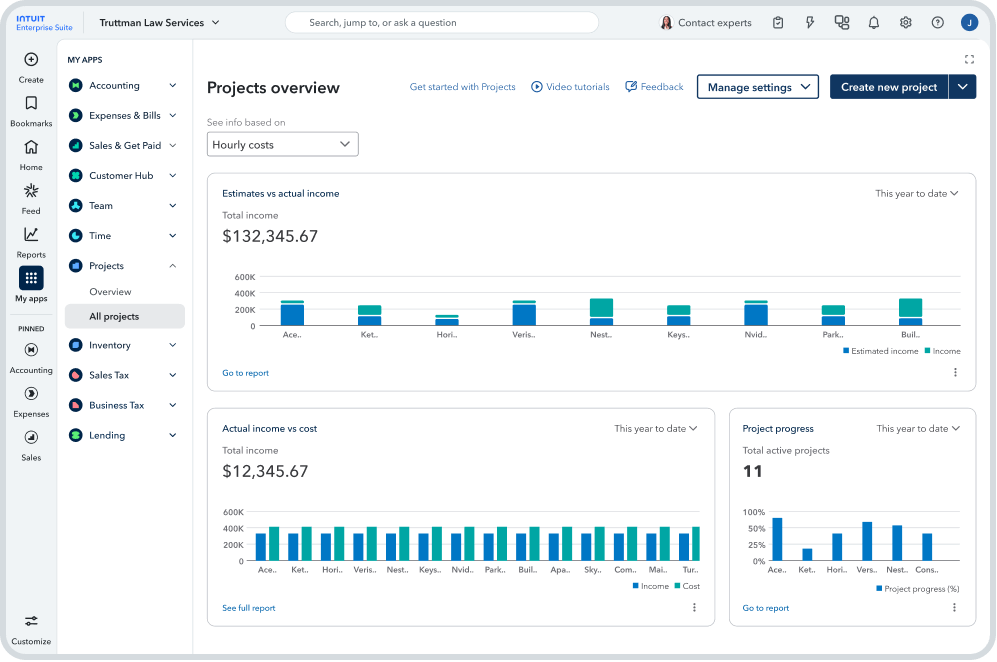
Intuit Enterprise Suite helps you deliver on budget with cross-portfolio visibility from a single dashboard. You can monitor your entire business alongside all your projects, as well as overall profitability using reports and integrations purpose-built for project-based businesses businesses. Run reports ready-made for professional service, or choose from 15 new reports.
You can also save time by managing multiple users, entities, locations, and subsidiaries from a single sign-in, plus, create intercompany transactions with automatic eliminations and see consolidated reports across your business.
Multi-dimensional reporting lets you streamline key decisions. Use standard reports, or leverage real-time insights to create investor-ready reports with up to 20 dimensions. You can also consolidate and categorize data across payments and accounting by line item and easily populate comprehensive reports.
AI-powered recommendations based on your business’ project income and cost data give you deeper project profitability insights, and click down using industry-tailored reports, KPIs, and third-party integrations with top industry apps like BigTime, Clio, and Projectworks.
Real-time job costing, profitability monitoring, and detailed reporting with custom fields let you set project goals and manage project profitability. Rich, transaction-level data and reports filtered by project manager give you the info you need to make faster decisions.
Yes. Your last five years of performance data are used to establish baselines so you can plan ahead with accurate projections. You can also set project goals and manage project profitability with real-time job costing, profitability monitoring, and detailed reporting with custom fields. And, as regulations change, you can stay compliant and plan for the future with AI-generated forecasts and granular insights.
With features like intercompany transacting and consolidated reporting, Intuit Enterprise Suite is built so that certain apps like Reach, Fathom, LivePlan, and Syft are no longer necessary. However, Intuit Enterprise Suite supports advanced integrations so you can continue to use apps that support industry-specific needs, such as BigTime, Clio, and Projectworks. Never miss a beat and stay productive by integrating your current tools into Intuit Enterprise Suite.
Each migration is unique depending on your current platform and your business. Whether you’re migrating from QuickBooks Online, QuickBooks Desktop, or a non-Intuit solution, we’re here to make the transition smooth, accurate, and effective, and we will be your dedicated partners throughout the entire migration process. You will be assigned a Customer Success Manager who will stay alongside you at each phase, and is capable of assigning the necessary resources to your case so that you always have what you need.
If you need any customizations or additional solutions in your migration and implementation process, your Account Manager will be available to assist you.
To learn more about the migration and implementation process, click here.